polski
 español

 Aleksander Janicki

If you run a news website or publish content online, Google Trends can help you spot what people are searching for and decide what to cover next.
In brief
What is Google Trends?
It is a free tool from Google that measures interest in a specific topic over time (on a scale of 0-100), rather than the total number of searches. It allows you to analyze current, past, and seasonal trends.
Why is it important for publishers and marketers?
By understanding when people are searching for specific topics (like "swimwear" in summer or "Halloween costumes" in September), you can plan your content and marketing campaigns ahead of time, before your competitors do.
How can journalists use it?
The Trending now page shows searches that have recently spiked, with timeframes from the past 4 hours to the past 7 days. Covering a verified, newsworthy trend quickly can bring you more traffic and may help your story appear in Google News.
Does regional language matter?
Yes. Google Trends lets you filter by subregion (state or city). This helps you choose the right vocabulary for your audience—for example, checking whether to optimize for "skillet" or "frying pan" based on local preferences.
How does AI enhance Google Trends?
The new Gemini integration in the Explore page suggests related search terms and adds them to a multi-term comparison graph, which can speed up your keyword research.
Table of contents
- What is Google Trends?
- How to use Google Trends?
- Seasonal trends in Google Trends
- The importance of regional language in Google Trends
- How journalists can use Google Trends
- Using Gemini to explore search trends
- Summary
What is Google Trends?
Google Trends is a free tool from Google that allows you to analyze search trends. First, it’s worth clarifying what Google means by a ‘trend’, because it isn’t quite the dictionary meaning.
The Cambridge Dictionary states that a trend is ‘a general development or change in a situation or in the way that people are behaving.’
In Google Trends, a trend simply refers to interest in a topic over time.
Analyzing seasonal, emerging and historical trends can help you make better decisions about when to publish articles and how to run marketing campaigns.
Using Google Trends, you can find useful statistics on topics that interest you. For example, if you sell swimwear, you can access information on when people are most likely to search for them online.
That way, you’re less likely to waste money promoting swimwear when few people are looking for it. Instead, you can check how searches for swimwear-related phrases have performed year after year over the past five years, and plan your campaign ahead of the seasonal peak, before your competitors do.
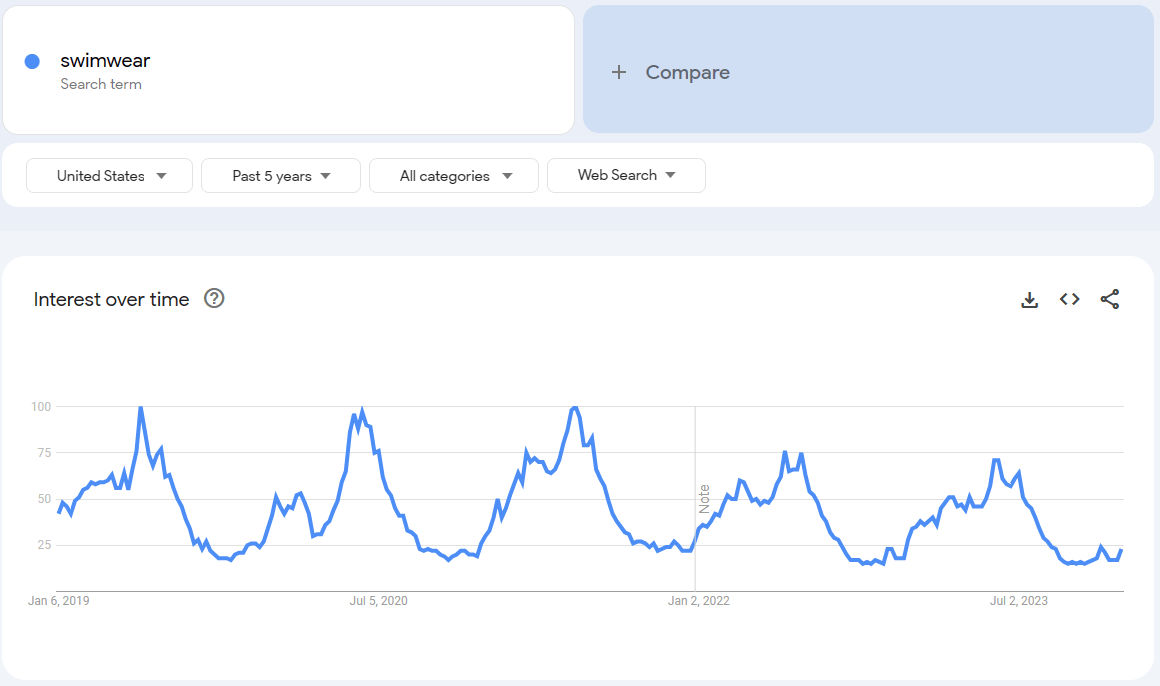
This also works the other way: if you run a general news website, or if it has, for example, a sports section, you can track trends in the whole United States or just the states or metro areas you are interested in and write about these topics.
Trends are represented by graphs, in which you see increases and decreases in the popularity of certain keywords. However, they are not meant as a total number of searches. Instead, the data is normalized and indexed on a scale of 0-100, where 100 marks the peak of interest in a term for the selected region and period, and 50 means half of that peak’s relative interest. A value of 0 usually means there was not enough data. Because of this, comparing two keywords in separate charts can be misleading, as each would have its own scale. You can avoid this problem by comparing keywords on the same chart, making it easier to see which attracts more search interest.
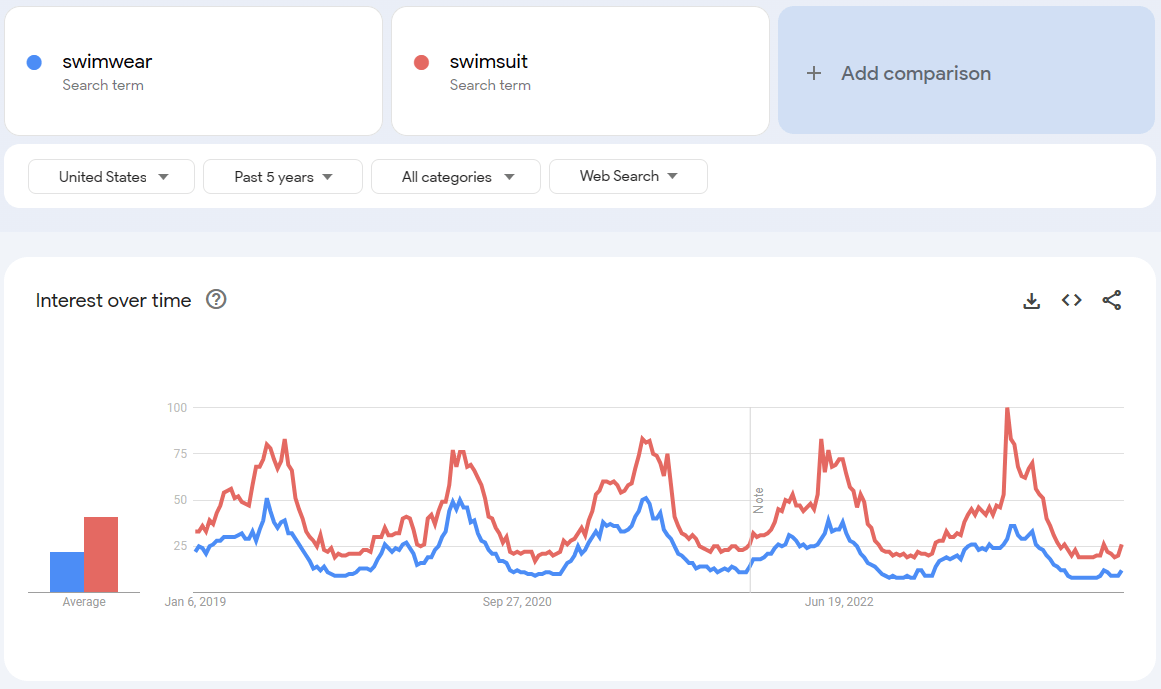
Google Trends filters out duplicate searches from the same person within a short period, which limits their impact on the data.
How to use Google Trends?
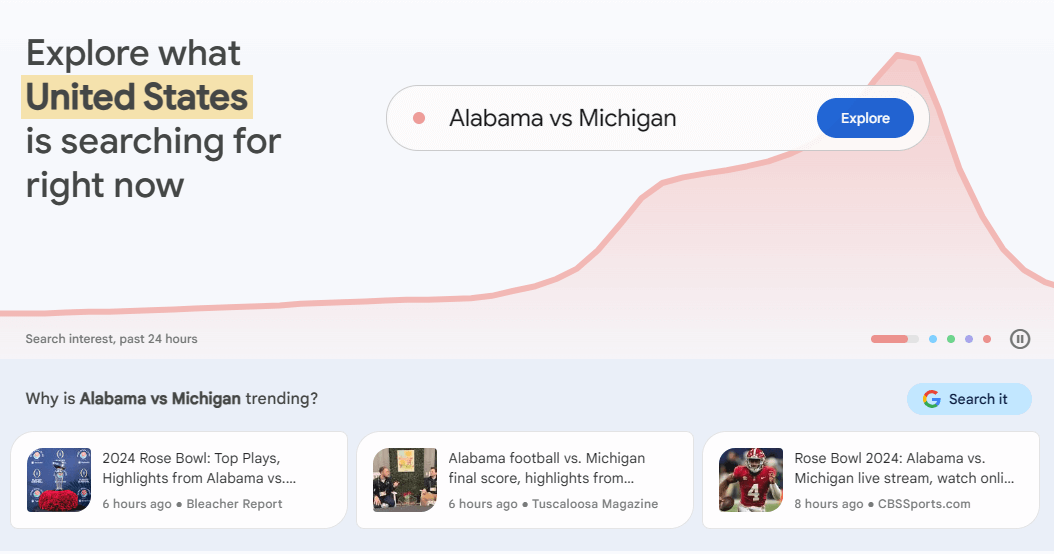
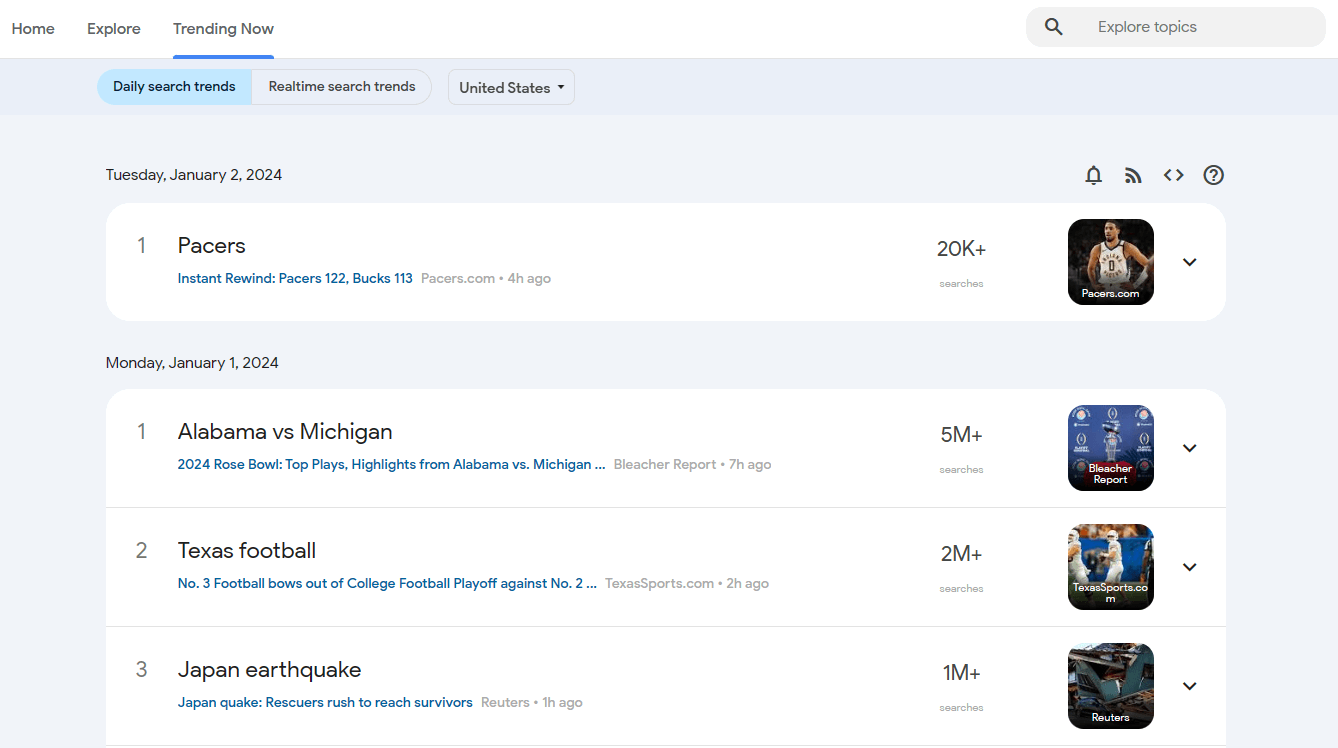
Go to trends.google.com. You’ll see a page like this in the screenshot above. The site immediately suggests the topics that are most popular in a specific location, in this case, the United States of America.
Each popular topic in the panel at the top of the page comes with links to articles that offer context on the topic. Reading them will help you cover these topics and benefit from their rising popularity.
To see the full list of current trends, open the Trending now page.
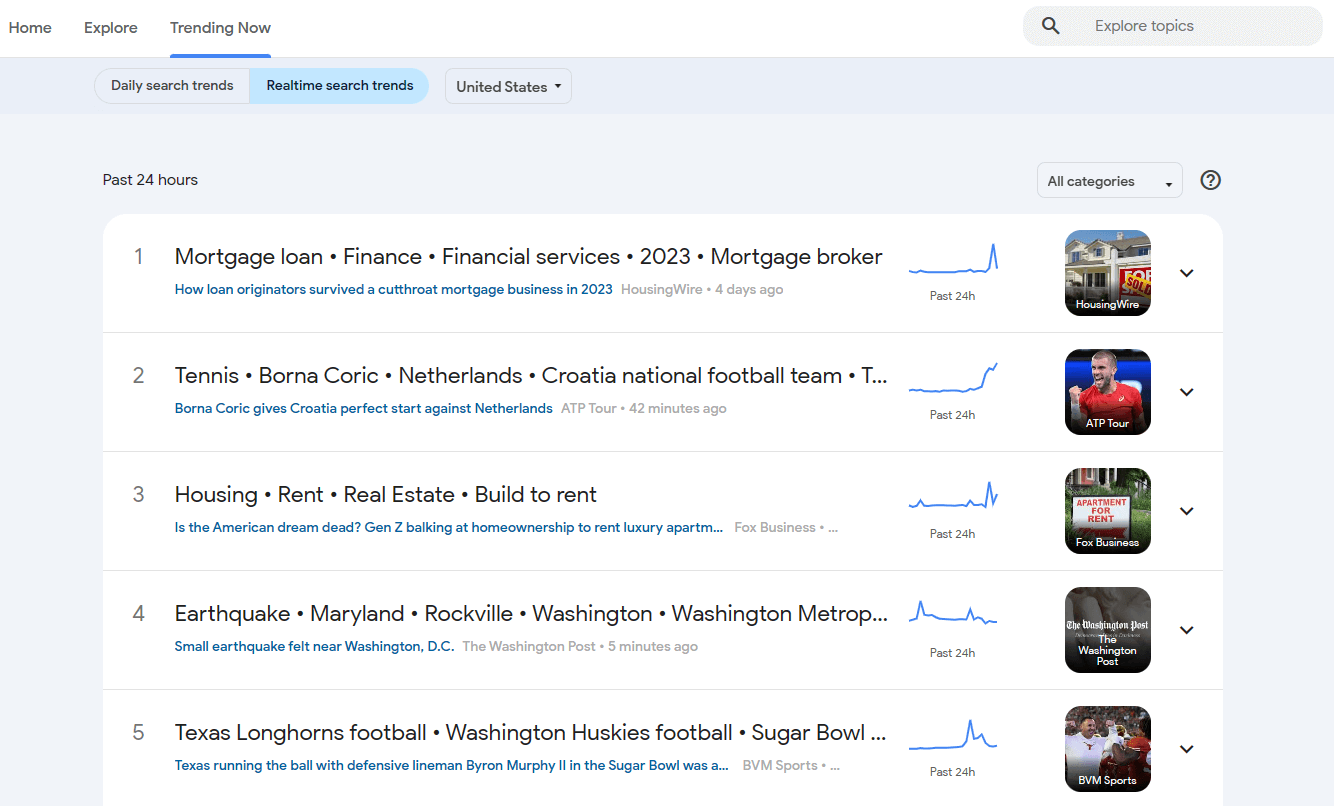
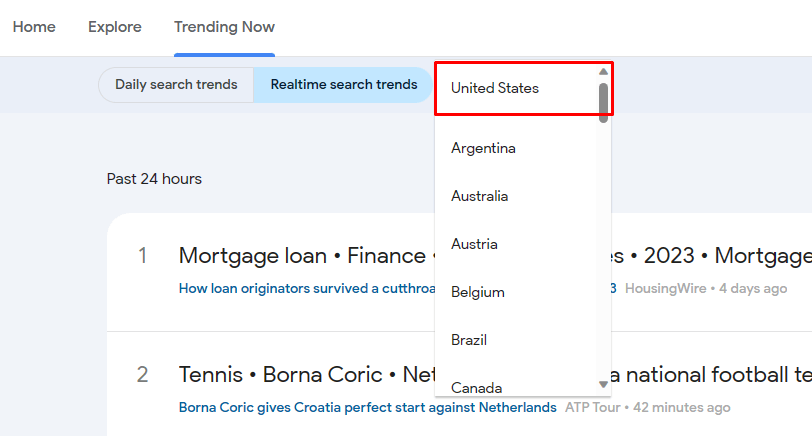
Use the timeframe filter to switch between the past 4 hours, 24 hours, 48 hours and 7 days. Then choose the country or region you want to follow.
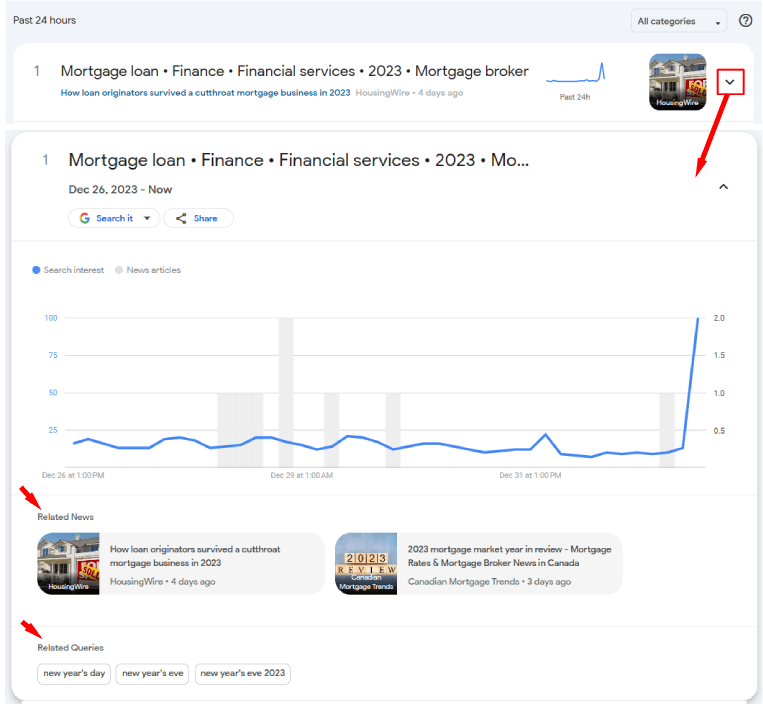
Open a trend to see related articles and similar search queries. These queries can help you understand what people are searching for and which terms to include in your article.
However, following a trend that is already on the list means you may be competing with plenty of other publishers. Instead of joining late, it's better to get a little ahead of existing trends. How can this be achieved?
Seasonal trends in Google Trends
Seasonal trends are search terms that gain popularity at around the same time each year. In the summer, it is unlikely that anyone would want to buy a winter jacket. In winter, on the other hand, no one buys sun hats.
The same pattern applies to holidays: interest in fireworks tends to rise before the Fourth of July and New Year’s Eve, while searches for turkey pick up before Thanksgiving. By analyzing how popular search terms are throughout the year, over several years, you can draw fairly safe conclusions. For example, for at least 5 years interest in Halloween costumes has started to grow in early September.
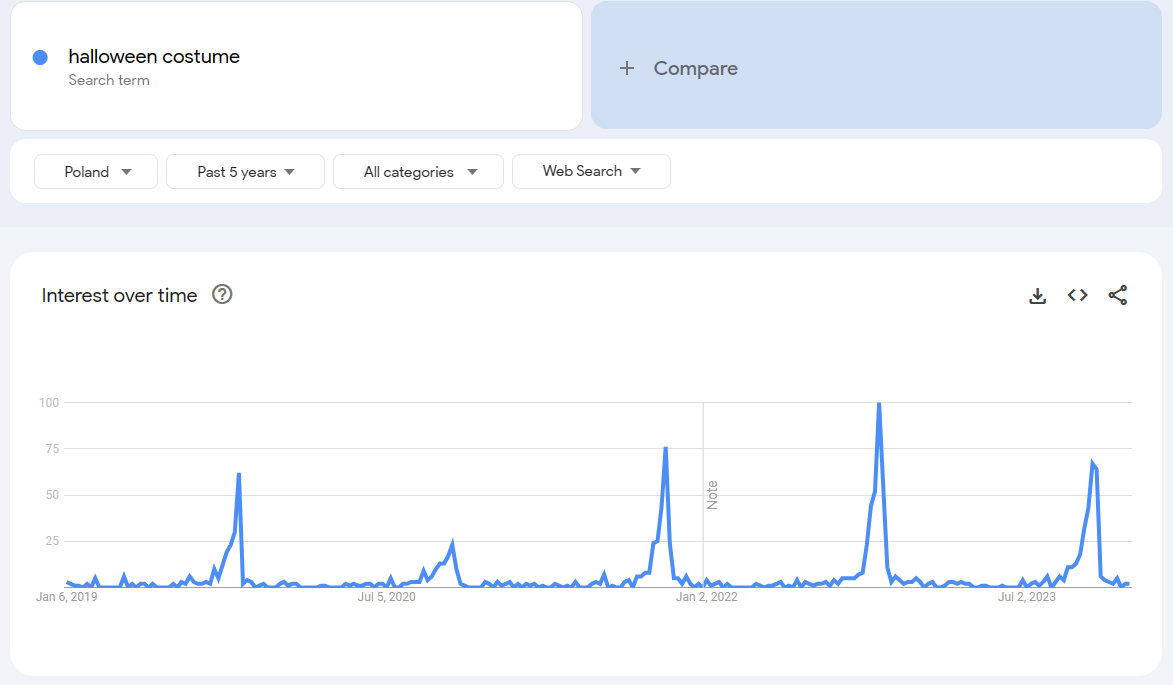
Charts like this also show what they can’t explain. In Poland, interest in “Halloween costume” was lower in 2020 than in previous years and higher in 2021 than before the pandemic. The pandemic may have played a part, but the chart alone doesn’t tell us why, so treat such explanations as hypotheses. What the pattern does show is timing: if you want to get ahead of the competition, publish your Halloween content as early as the first week of September.
Keep in mind, however, that if the keyword is relatively new – for example, a new movie has just been announced – there is little or no historical data, so results from previous years can be misleading. Check the trend’s history before drawing conclusions.
The importance of regional language in Google Trends
American English varies by region, including in the words people use for everyday objects.
The internet has made regional differences easier to notice. Still, people tend to have their own preferred terms for everyday objects. Some say “tennis shoes,” while others say “sneakers” – and that preference can carry over into their searches.
It helps to know which terms are used nationwide and which are more common in particular regions. Let's take ‘skillet’ as an example.
If someone from the South were to sell skillets to the whole country, he might not understand why his marketing efforts fall flat.
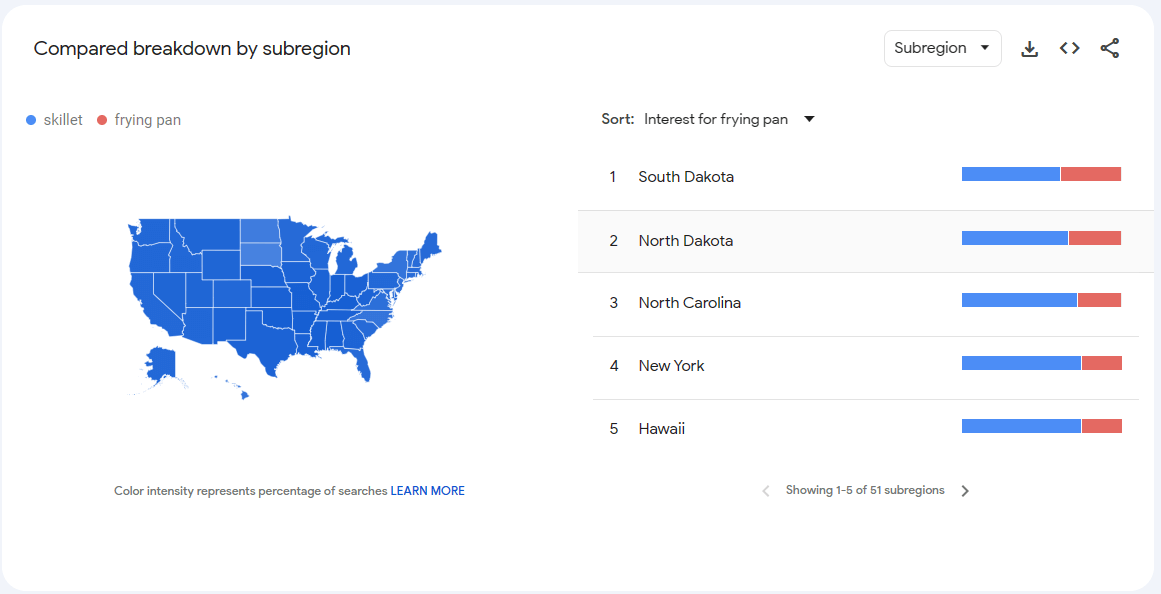
While ‘skillet’ is commonly used in the Midland and South, people in other regions may prefer the term ‘frying pan’. As a result, someone looking for a new pan may never search for “skillet.” Google Trends lets you analyze the popularity of certain terms by state or even city.
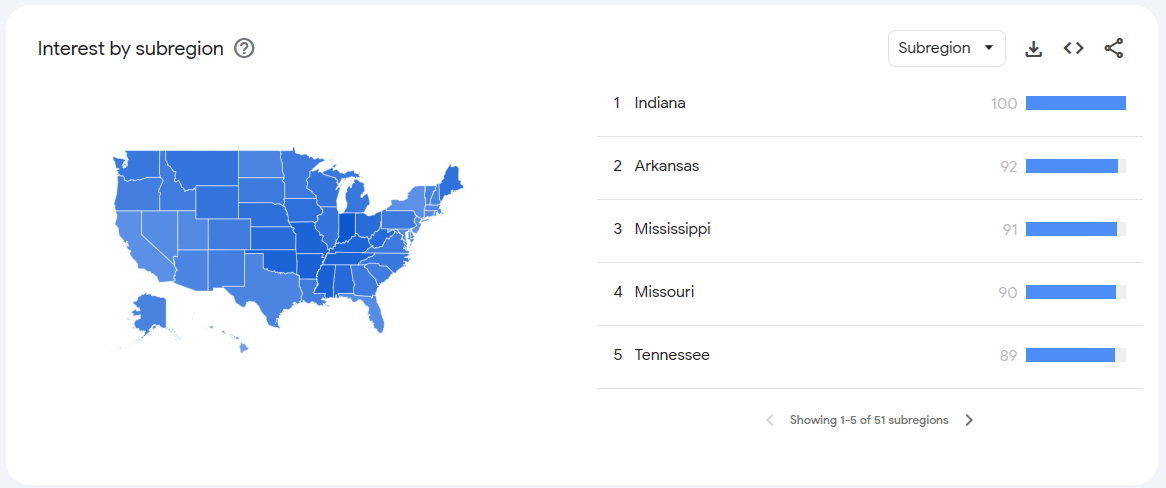
By typing in ‘skillet’ and scrolling down, you can see which states show the most interest – in this example, Indiana stands out.
To compare the terms, add “frying pan” to the chart. This will help you see which term attracts more search interest across the country.
How journalists can use Google Trends
If you run a general-interest news website, you need to keep publishing stories that matter to your readers. If a search starts gaining traction locally or nationwide, investigate whether there’s a story worth covering. You could attract a lot more traffic to your website.
How do you find these searches in Google Trends? The key is knowing how to read the charts.
To get to them, open the Trending now page. Set the timeframe to the past 4 hours or the past 24 hours, and tick “Show active trends only” to hide trends that have already ended.
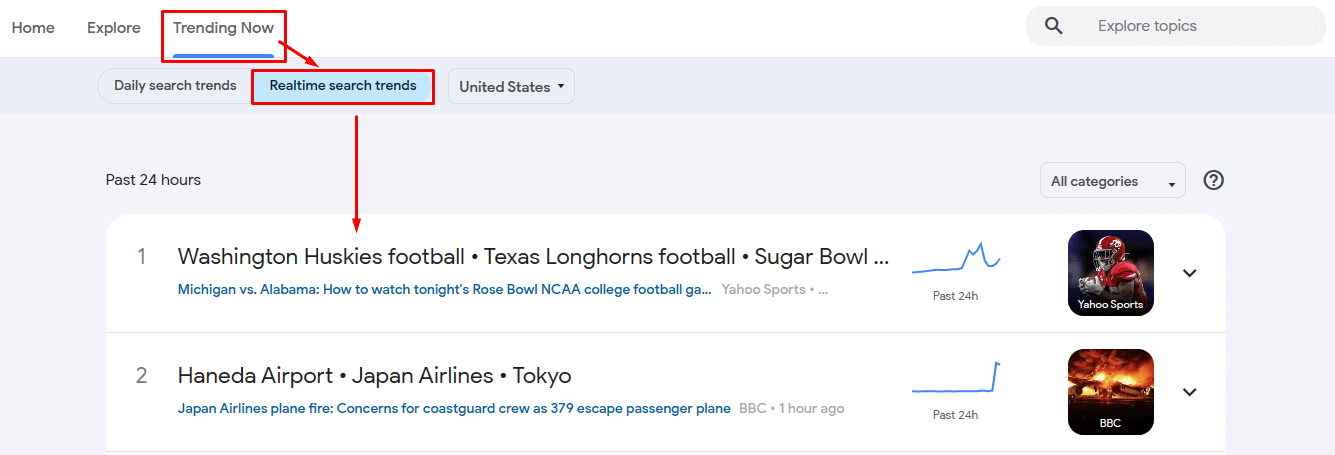
The Trending now page lists searches that have recently spiked on Google, and the trend chart shows how interest has developed over the selected timeframe.
If you see a graph like the one below next to any of the topics and headlines:

it may mean, for example, that new facts on the topic have come to light or that something new has happened, and the topic is gaining popularity. A spike only shows that interest is rising, not why, so check what is behind it first. If there is a verified story, publish on the same day, while interest is still high.
To see a more detailed chart, click the row of the trend.
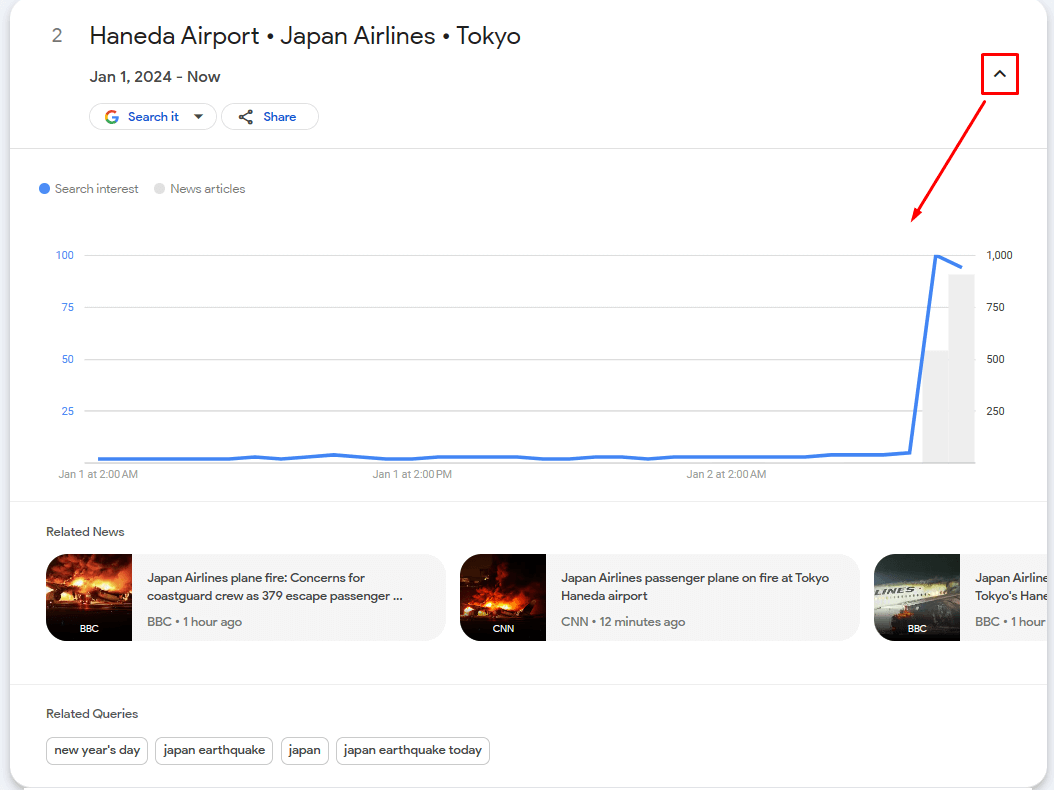
The chart clearly shows that in the last hour, the interest has increased significantly. That’s a signal for journalists to investigate the topic.
Under the chart, related news will also be displayed, which journalists can review to see what has already been covered and what still needs reporting.
Also check the “Related queries” section. Some of these queries may be useful for headlines or section headings in your article.
The main keywords to use in the article title or H2 heading in the example above are the search terms highlighted in Google Trends, such as “Japan earthquake”.
But simply writing an article on a trending topic in the last 24 hours is not enough.
After publishing, you can request indexing through Google Search Console. Indexing doesn’t guarantee visibility, but it helps Google find the article sooner.
Using Google Trends to cover emerging topics can help you:
- attract more visitors from search and social media;
- build trust by covering stories that matter to your audience, not just local accidents and crime stories. Making a national topic feel local can bring even bigger benefits;
- improve your chances of appearing in Google News, for example in the For You or Picks for you sections, although inclusion is never guaranteed.
Using Gemini to explore search trends
To explore trends more quickly, you can use the new Gemini integration on the Trends Explore page (available on desktop).
Say you run a travel or outdoor blog and want to cover hiking trails in your area.
Instead of guessing which destinations people are interested in, open the AI side panel and try a prompt such as “hiking in California for beginners.”

Gemini suggests related search terms based on your prompt, such as "Yosemite National Park" or "Joshua Tree National Park," and adds them to your dashboard.

You can then add these suggestions to a single multi-term comparison graph. This can speed up your initial keyword research and surface related topics you might otherwise miss. Keep in mind that Google Trends shows relative interest, not the reasons behind it, so treat the suggestions as a starting point.
Summary
By tracking seasonal, rising and declining trends, you can spot promising story ideas and see when interest in a topic starts to fade.
When your team runs short of story ideas, Google Trends is a useful place to start. Use it to spot emerging topics and reach more readers.
Remember, however, that results may take time when you’re trying to get ahead of a trend.