polski
 español

 Grzegorz Olifirowicz
Table of Contents
- Where to Find the Filter Panel
- Filters in Advanced Search
- A Practical Example Scenario
- The Most Common Mistakes and How to Avoid Them
- Summary
This article is a practical guide to all the options for filtering sponsored article publishing sites available in ADS4media. We will show you how to make full use of Advanced search to quickly find the most important information, sort offers and make the right decisions. Let's get started!
Where to Find the Filter Panel
You can find the advanced filter panel in ADS4media in several ways.
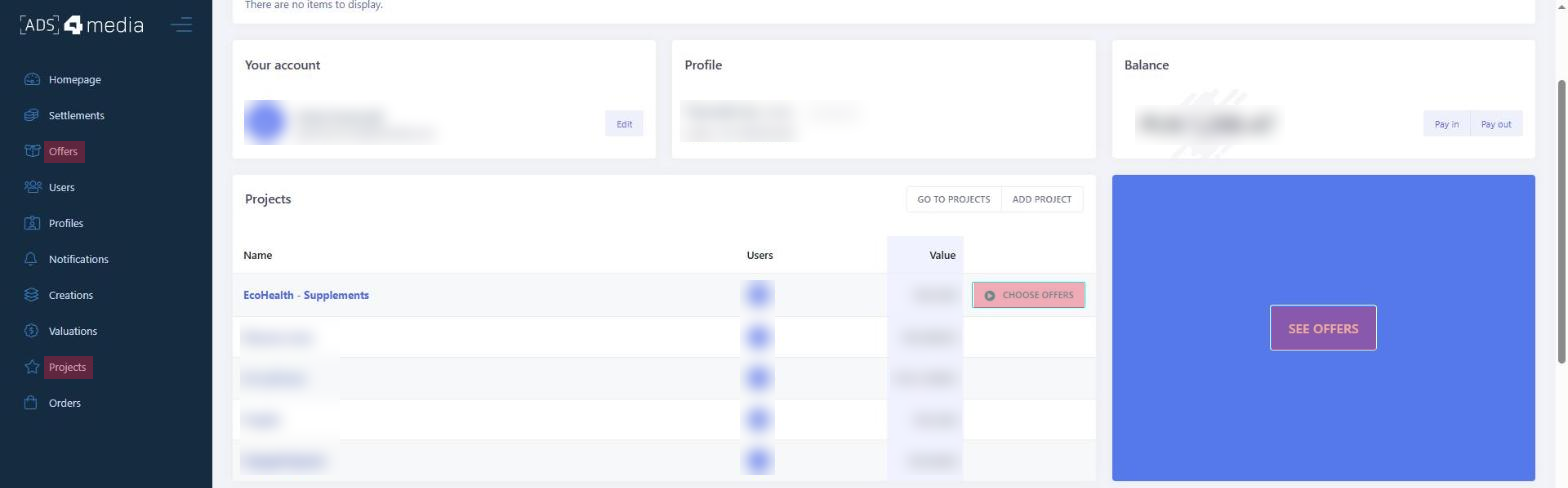
- From the home page of the advertiser view, click the blue box with the “SEE OFFERS” button. This will take you directly to the offers view.
- Also from the advertiser's home screen, you can find the box with the list of your saved projects (we will explain what projects are and why they matter when using advanced filters in a moment). There, click the “Choose offers” button next to the project you want to use.
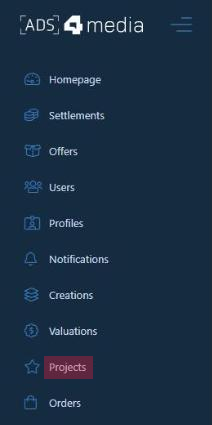
(you can do the same from the full view of your projects, which you open with the “Projects” button in the vertical menu on the left)
Finally, you can also use the menu bar on the left side of the screen. There, find the “Offers” button, which will also take you to the place where you can browse offers and use advanced filters.
Then, below the main search bar, where you can select the topics of portals, you will find the “Advanced search” button.
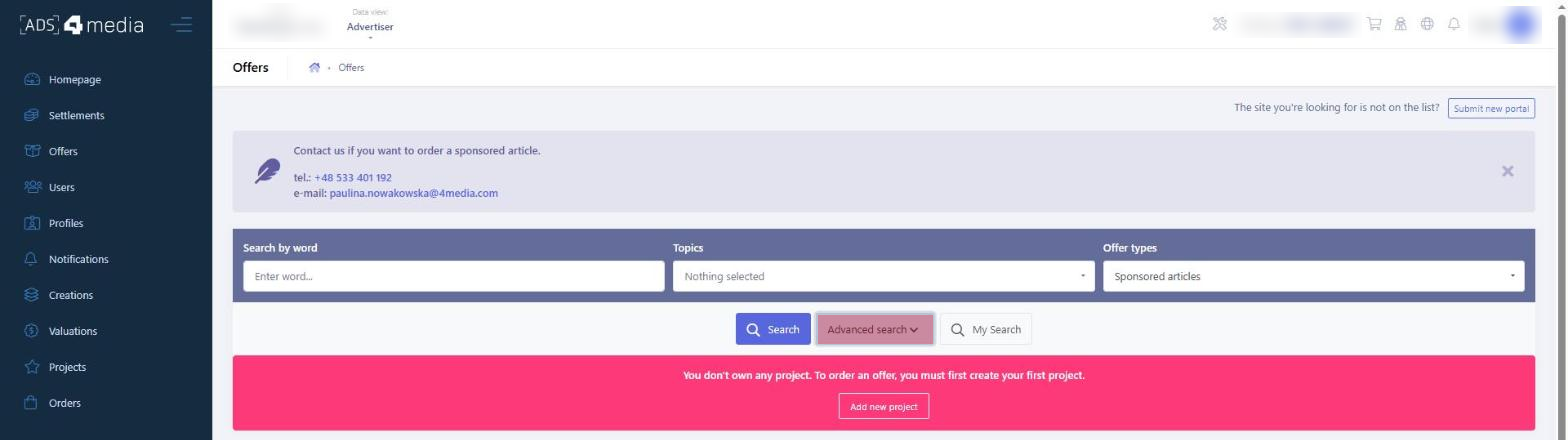
Remember that in order to order offers, you need to create a project first.
A project is a place in ADS4media where you collect portals related to a specific activity or campaign. For example, if you create a project called "SPORTS", you add to it the portals on which you plan to publish sports-related content.
Projects make it easy to manage your campaigns and filter offers according to your specific needs.
Filters in Advanced Search
Publishing Sites Used
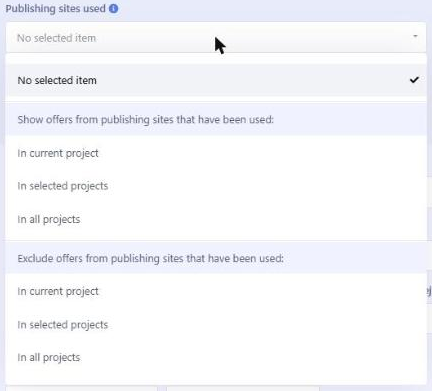
The advertiser can precisely filter the publishing site offers in ADS4media. They can display only the offers that have already been used in the current project, in selected projects or in all projects.
Alternatively, there is an option to exclude offers from publishing sites that have already been used in the past – also within the current project, selected projects or all projects.
This is important for advertisers, because it gives them better control over their campaigns, helps them avoid publishing repeatedly in the same places and lets them optimize their strategy by choosing new portals – or the same, potentially more effective ones as before.
It also makes it possible to track your publication history and analyze which sites delivered the best results.
Language, Country and Region

In ADS4media, advertisers can filter publishing site offers by the language of the website (the most popular languages are available), by country (including the most popular and most developed countries in the world) and by region (e.g. individual states for the United States or voivodeships for Poland).
Using these filters, advertisers can target their campaigns precisely.
Filtering by language lets you reach specific language groups, which is crucial in international campaigns. Choosing a country allows you to tailor your offer to the local market and culture, and the region filter makes even more detailed targeting possible – for example, to specific states.
Thanks to these filters, advertisers can optimize their activities, increase their effectiveness and reach the right target audience.
Acceptable Subjects
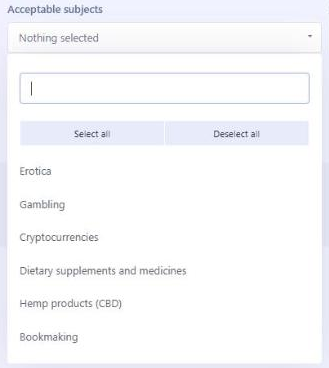
The "Acceptable subjects" filter in the ADS4media filter panel lets you choose from a list of subject categories such as erotica, gambling, cryptocurrencies, dietary supplements and medicines, hemp products (CBD) and sports betting.
Selecting a specific subject, e.g. CBD, makes the panel filter both niche portals that specialize in this area and general portals that accept content related to the selected subject.
You can select several subjects at once to narrow down or broaden the search results for sponsored article publishing sites.
Featured Media
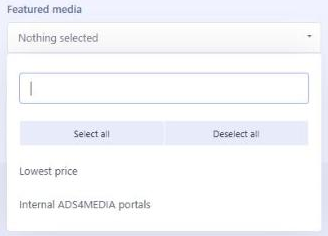
In the "Featured media" section of the ADS4media filter panel, advertisers can use the "Lowest price" option.
This filter displays offers from portals that offer the most attractive prices compared to the competition.
This means that the platform identifies the same portals that are also available from other providers and marks the ones that are cheaper in ADS4media. Portals available exclusively through ADS4media also get the “Lowest price” label. In other words, it is the cheapest offer for a given portal on the market (also compared to competing advertising marketplaces).
Selecting this filter lets advertisers quickly find the most economical options for publishing sponsored articles, which is especially important on a limited budget or in large campaigns, where even small price differences can add up to significant savings.
ADS4media also lets you filter offers to "CMS4media internal portals".
These are websites that use our proprietary CMS4media system.
By choosing this filter, advertisers can be sure that they publish articles on portals we work closely with.
This can make communication and the publishing process easier, and potentially open up additional promotional opportunities.
Working with CMS4media internal portals often comes with additional benefits (faster turnaround, the option to order by email, the option to buy article packages and the best value for money) and better control over the published material.
Only New Broadcasting Sites

ADS4media also offers the "Only new broadcasting sites" filter, which narrows the search results down to portals added to the platform within the last 30 days.
This option is ideal for advertisers looking for fresh, untapped places to publish their sponsored articles.
It is also a great option for those who want to test new content distribution channels and expand their publication portfolio with promising, growing websites.
Statistics
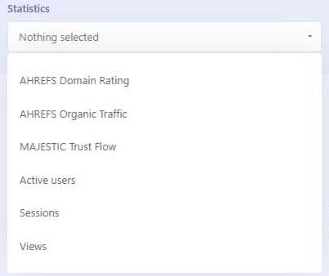
Ahrefs Domain Rating
Ahrefs Domain Rating (DR) is a metric that measures the strength of a website's backlink profile.
Put simply, DR shows how strong and trustworthy a website is in the eyes of Google, based on the number and quality of links pointing to it from other websites.
The metric was created by Ahrefs, a company specializing in SEO analysis tools.
DR takes into account how many other websites link to a given site and how strong and trustworthy those websites are. The more good links point to a site, the higher its DR.
A higher DR means the site has more valuable links, which usually translates into better visibility in search results.
For someone new to SEO, DR is a good indicator of whether it is worth publishing a sponsored article on a given portal.
Portals with a high DR usually pass on more SEO value, which means that a link from such a portal can have a more positive impact on your website's position in search results.
It is worth looking for portals with a DR above 20-30 if you want to quickly increase your visibility and build a strong backlink profile.
But what about portals with a DR below 20? It all depends on your strategy!
If your goal is to reach a very niche, local audience, portals with a lower DR that are well established in that particular niche can be more effective. It is important to match your choice of portals to your goals and campaign strategy. Sometimes publishing on a smaller but highly topical portal can bring better results than on a large, general website – and vice versa: publishing in the right topical category of a general-interest portal can also pay off.
DR values range from 0 to 100.
Of course, DR alone is not everything, but it is a good starting point for assessing the potential of a publishing site.

Majestic Trust Flow
Majestic Trust Flow is a metric created by Majestic, a company specializing in link analysis.
Unlike Domain Rating (DR), Trust Flow focuses more on the quality of links than on their quantity. Simply put, Trust Flow shows how "trusted" a website is by analyzing the links pointing to it from sites that are themselves considered credible and trustworthy.
An easy way to understand it is to compare it to a book recommendation. Imagine someone recommends a book to you. If the recommendation comes from someone you trust and whose opinion you value, you are more likely to read that book.
Trust Flow works in a similar way.
If your website has links from highly trusted sites, your Trust Flow will also be higher.
A high Trust Flow suggests that a website is connected with good and credible sources on the web, which can have a positive impact on how search engines perceive it. For you, as someone publishing sponsored articles, Trust Flow is another indicator that helps you assess whether it is worth placing an article on a given portal.
The higher the Trust Flow, the more likely it is that a link from that site will bring benefits and help build your website's SEO authority. That is why it is worth paying attention to Trust Flow, especially if you care about links from credible sources.
As a rule of thumb, Trust Flow values above 15-20 can be considered good, and the higher the score, the better. Keep in mind, however, that Trust Flow should be analyzed in the context of the site's subject matter – for niche, specialist portals, even lower values can be valuable.

Active Users
Active users is a filter based on Google Analytics 4 (GA4) data and refers to the number of people who actively use a given website over a specific period of time.
"Active users" are people who visited the site and took some action on it, e.g. browsed content, clicked links or interacted in other ways. GA4 collects data on how users interact with a website or app, what actions they take, where they come from and much more.
This data helps website owners and marketers understand how people use their online resources, what works well and what can be improved.
A high number of active users suggests that a portal is popular and its visitors are engaged. This, in turn, may indicate a potentially greater reach and effectiveness of a sponsored article published on that portal.
The more active users, the greater the potential reach and effectiveness of your sponsored article.

Sessions
The "Sessions" filter in ADS4media, based on GA4 data, tells the advertiser how many visits (sessions) a given website generates. A high number of sessions means that the portal has a lot of traffic and is visited frequently.
For advertisers this is valuable information, because the more sessions, the greater the chance that a sponsored article will be noticed by a wide audience.
In the ADS4media advanced search filter panel, you can set a range of values for the number of sessions. For example, you can choose portals with at least X sessions per month to make sure you select high-traffic publishing sites.
Setting the right range lets advertisers narrow the search results down to portals that meet their criteria in terms of popularity and potential reach.

Views
A "view" is every single page load by a user.
This means that every time someone opens a specific page within a given portal, GA4 records it as one view. If the same user refreshes the page or comes back to it, it is counted as another view.
Simply put, views show how many times a portal's pages were displayed to users.
A high number of views means that a portal generates a lot of traffic and is visited often. For advertisers this is important information, because the more views, the greater the chance that a sponsored article will be seen by a large number of people.
In the ADS4media advanced search filter panel, you can set a range of values for the number of views. This way you can make sure you choose highly visible publishing sites.
Setting the right range lets advertisers find portals with great potential to reach a wide audience.

Sponsored Articles Section
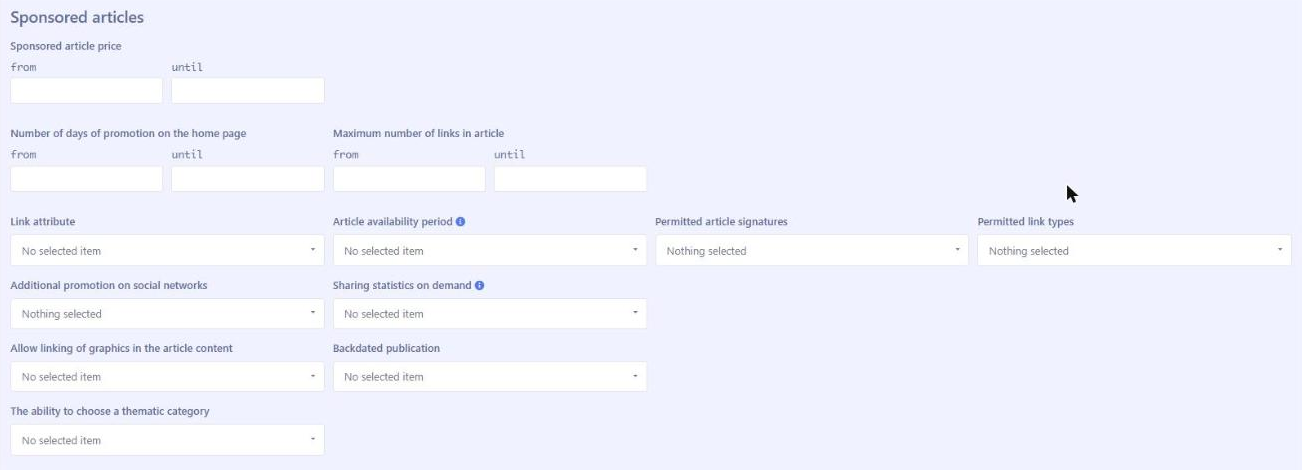
Sponsored Article Price
“Sponsored article price" in ADS4media refers to the cost of publishing a sponsored article on the selected portal, and it is always a net amount (excluding taxes).
It is a key element for advertisers planning their budget and comparing offers from different publishing sites.
You can set a price range by specifying the minimum and maximum acceptable price. The platform will then display only the offers whose cost falls within that range. This allows for even more precise filtering and helps you quickly find offers that match your campaign budget.
Number of Days of Promotion on the Home Page
"Number of days of promotion on the home page" refers to how long a sponsored article will be displayed in a prominent place on the portal's home page.
This means that for a specific number of days the article will be featured and easy for visitors to find, which increases its visibility and the chance that it will be read.
Maximum Number of Links in Article
In the "Maximum number of links in article" section, you can specify how many links the published sponsored article may contain.
This is important from an SEO point of view, because the number of links in an article affects their strength and their value for search engine optimization.
In ADS4media, you can set a range by specifying the minimum and maximum number of links allowed. The platform will then display only the offers that fall within that range.
Keep in mind that too many links in an article can weaken each of them. As a rule, it is better to include fewer links pointing to valuable, topically related pages than to add too many, which search engines may consider spam.
Link Attribute
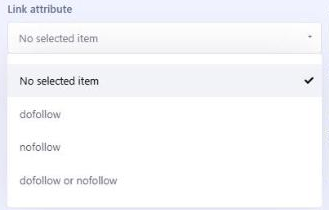
Dofollow and nofollow – what are they?
When a website links to another site, the link can carry a special tag that tells search engines such as Google what to do with it. These tags are "dofollow" and "nofollow".
- Dofollow: This is the default setting for links. It means that the search engine "follows" the link and treats it as a vote from one site to another saying that the other site is valuable. A "dofollow" link passes part of the SEO "power" from the page it is on to the page it points to. It is as if site A were saying: "I think site B is great and worth visiting".
Passing SEO power means that part of the authority and credibility of the linking site is transferred to the target site, which can help it rank higher in search results. In practice, a "dofollow" link from a strong site can help your website climb higher in Google's rankings.
- Nofollow: This is a special tag that tells the search engine: "Do not follow this link and do not treat it as a vote of support". A "nofollow" link does not pass SEO power. It is as if site A were saying: "I'm linking to site B, but I can't vouch that it's great".
"Nofollow" links can still drive traffic to your website, but they do not directly help improve its position in search results.
How does it work in ADS4media?
In ADS4media, you can filter offers by choosing whether you want only "dofollow" links, only "nofollow" links, or both types of links.
- dofollow: If you select this filter, you will see only the offers where links in sponsored articles are "dofollow", i.e. they pass SEO power.
- nofollow: If you select this filter, you will see only the offers where links are "nofollow", i.e. they do not pass SEO power.
- dofollow or nofollow (no selected item): If you do not select either of these filters, you will see all offers, both with "dofollow" and "nofollow" links.
Why does it matter?
For SEO (search engine optimization), "dofollow" links are important, because they help the page they point to climb higher in search results. "Nofollow" links can still be valuable because they drive traffic to your website, but they have no direct impact on SEO. Which filter you choose depends on your strategy and campaign goals.
Article Availability Period
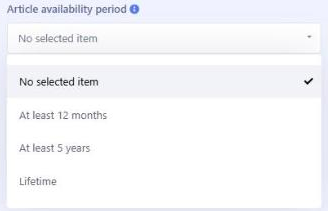
The "Article availability period" filter in ADS4media lets you choose how long a sponsored article will remain published on the selected portal. The main options are:
- At least 12 months: With this option, you can be sure that the article will be available on the portal for a minimum of 12 months. After that time, the portal owner has the right to remove the article or change the link attributes to "nofollow", but is not obliged to do so. This means the article may stay on the site longer, but this is not guaranteed. In practice, in the vast majority of cases articles are not removed or changed after 12 months from publication.
The advantage of this solution is greater control over the content – after 12 months you can update the article or move it to another portal if necessary. In addition, a shorter availability period may be more cost-effective for a short-term campaign.
- Lifetime: This option means that the sponsored article will remain on the portal indefinitely.
The downside of the lifetime option is the lack of control over the content in the long run. The article may become outdated, and removing or editing it may be difficult. Moreover, if the portal changes its subject matter or character, the article may no longer be relevant to the target audience, which may also affect your SEO.
Choosing the right availability period depends on the advertiser's strategy and campaign goals. A longer availability period gives a better chance of long-term results and building lasting authority, while a shorter period offers more flexibility and control.
Permitted Article Signatures
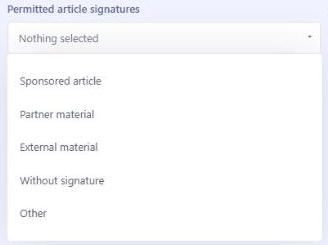
The "Permitted article signatures" section refers to the label that can be placed on a sponsored article. Please note that the final approval of a specific label is up to the portal's publisher. Some publishers have their own guidelines for labeling sponsored articles, while others may be more flexible.
In the panel, we have added the following suggested labels: Sponsored article, Partner material, External material, Without signature and Other. Using these labels, you can filter offers according to the rules publishers accept when labeling sponsored articles.
The law requires sponsored articles to be properly labeled so that readers know the material is advertising. In the United States, the Federal Trade Commission (FTC) requires native advertising to be clearly and conspicuously disclosed – for example as "Sponsored", "Paid post" or "Advertisement" – so that readers are not misled.
In ADS4media, when submitting your sponsored article creation, you can suggest your own label. However, the final decision on which label appears on the article lies with the portal's publisher. Advertisers should be prepared for the publisher to suggest changes or replace the proposed label with a different one.
Additional Promotion on Social Networks
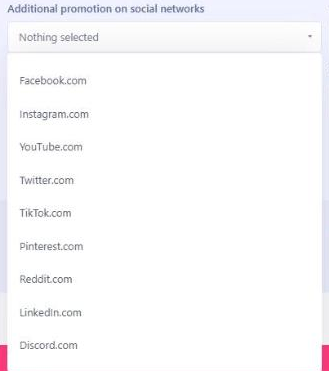
In ADS4media, you can filter offers by additional promotion on social media.
Websites offering advertising space for sponsored articles often also share a link to the published article on their profiles on various social media platforms.
If you want to increase your article's reach on social media as well, this filter will help you select the right portals.
Please note that the list of platforms where the link is shared may vary depending on the website, but we list at least 9 different social networks, which gives you plenty of promotional opportunities.
Sharing Statistics on Demand
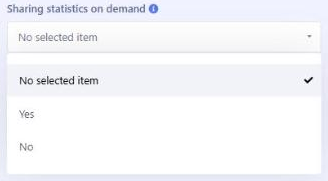
The "Sharing statistics on demand" filter means that the publisher of the portal on which the sponsored article is to be published can, at the advertiser's request, share statistics on the article's performance.
These statistics may include information on how the article is performing on the portal, e.g. how many views and clicks it received or what user engagement looked like.
Publishers provide statistics for the last 30 days.
My Search – What Is It and How Does It Work?
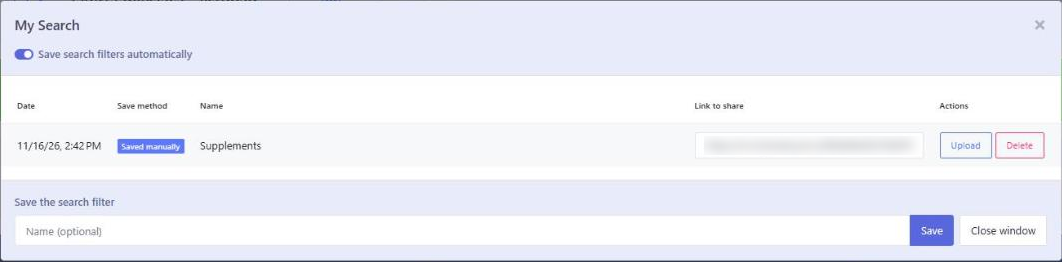
"My Search" in ADS4media is a feature that makes managing search filters much easier.
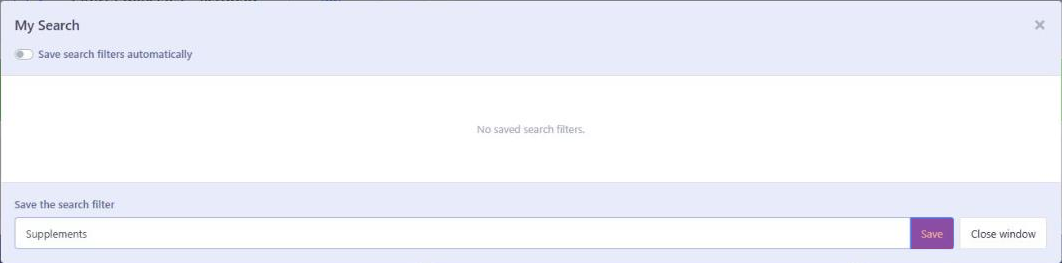
You have two options: you can manually save a set of filters you find useful, or turn on "Save search filters automatically".
When the second option is turned on, the platform automatically saves every set of filters used during a search. This way, even after you close and reopen the platform, your most recently used filters will still be available.
“My Search” lets you save filter sets for specific projects, so you can quickly switch between campaigns and easily recall the right search criteria. For example, for a project with a specific geographic reach, you can create and save a set of filters covering selected states and then use it again and again while working on that project.
A Practical Example Scenario
Let's say you are Greg, working in the marketing department of "EcoHealth", a company that sells organic dietary supplements. You want to run a sponsored article campaign to increase brand awareness and product sales. Here is how you can use Advanced search in ADS4media, step by step:
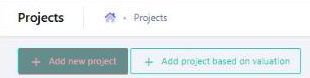
- Creating a Project:
- You log in to ADS4media and create a new project called "EcoHealth - Supplements".
- This project will be used to collect all the portals on which you plan to publish sponsored articles.

- Defining Campaign Goals:
- Your goal is to reach people interested in a healthy lifestyle, ecology and natural products.
- You want your articles to be published on trusted portals with good statistics, which will translate into better SEO and brand awareness.
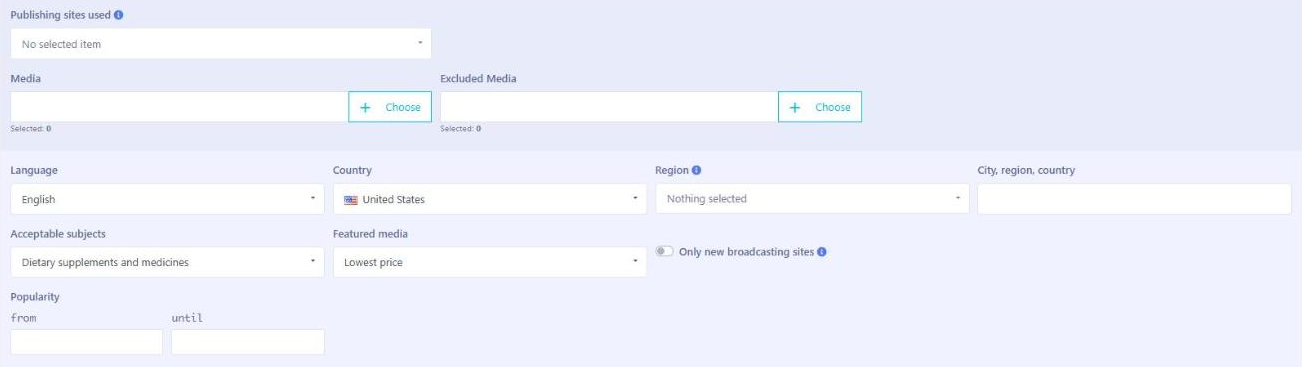
- Advanced Search – Step 1: Subjects, Language, Additional Settings:
- You go to the "Offers" tab and click "Advanced search".
- In the "Acceptable subjects" filter, you select "Dietary supplements and medicines", as this matches your intent.
- You choose the language "English", since the campaign is aimed at American readers. Country: United States. Region: you leave it empty, because the campaign targets the entire US.
- In the "Featured media" section, you can select "Lowest price" to find the most economical offers.
- Advanced Search – Step 2: Statistics:
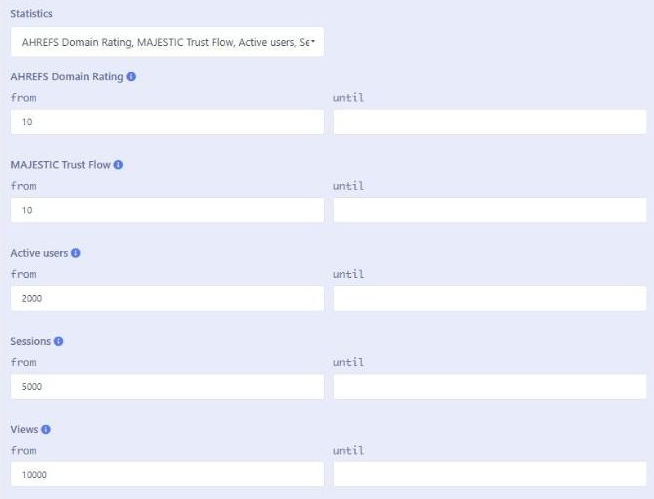
- You go to the "Statistics" section.
- You set "AHREFS Domain Rating" to a minimum of 10 to include portals with a lower but still valuable backlink profile.
- You set "MAJESTIC Trust Flow" to a minimum of 10 to find portals with acceptable links.
- You set "Active users" to at least 2,000 per month and "Sessions" to at least 5,000 per month to find portals with real traffic.
- You set "Views" to at least 10,000 per month, because you want a better chance of your article being seen by more people.
- Advanced Search – Step 3: Sponsored Articles:
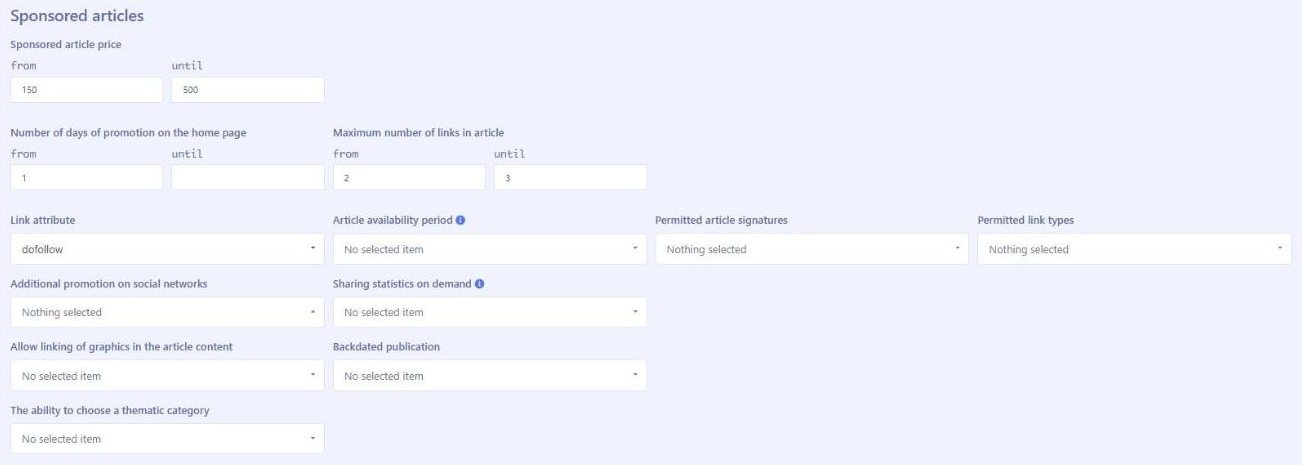
- You go to the "Sponsored articles" section,
- You set a price range, e.g. from $150 to $500, depending on your budget,
- You set "Number of days of promotion on the home page" to at least 1 day so that the article is clearly visible,
- You set "Maximum number of links in article" to 2-3 so that the links are strong and valuable,
- You select "dofollow" so that the links pass SEO power.
- Analyzing the Results and Adding to the Project:
- You review the search results, analyze each portal's statistics and read the descriptions.
- You add the portals that best match your goals to the "EcoHealth - Supplements" project.
- You can save the set of filters in "My Search" so you can come back to it in the future.
With this approach, using Advanced search in ADS4media, Greg from "EcoHealth" can effectively plan and run a sponsored article campaign, reaching the right target audience and achieving his marketing goals.
The Most Common Mistakes and How to Avoid Them
When using Advanced search in ADS4media, advertisers may make certain mistakes that affect the effectiveness of their campaigns. Here are some of the most common mistakes and tips on how to avoid them:
- Filters that are too narrow or too broad:
- Mistake: Setting too many restrictive filters can severely limit the search results, so many valuable portals get left out. On the other hand, filters that are too broad can display a large number of unsuitable offers.
- How to avoid it: Start by setting a few key filters, then gradually add more while watching how the results change. Experiment with different settings to find the optimal balance. Remember to tailor your filters to the specific goals of your campaign.
- Ignoring portal statistics:
- Mistake: Focusing only on a portal's price or subject without analyzing its statistics (DR, Trust Flow, traffic) can lead to choosing low-quality publishing sites with poor reach.
- How to avoid it: Always check portal statistics and make sure they meet your minimum requirements. Choose portals with a good backlink profile (DR and Trust Flow) as well as adequate traffic and user engagement.
- Not tailoring filters to the project:
- Mistake: Using the same filters for different projects with different goals and target audiences can lead to ineffective campaigns.
- How to avoid it: Always tailor your filters to the specific project and its characteristics. Create different filter sets for different campaigns and save them in "My Search" so you can easily return to them.
- Overlooking new broadcasting sites:
- Mistake: Focusing only on well-known, popular portals may cause you to miss new, promising publishing sites that may offer better terms or reach a new audience.
- How to avoid it: Regularly check the "Only new broadcasting sites" filter and test new portals. Be open to experimenting and don't be afraid to try lesser-known but potentially valuable publishing sites.
- No analysis of results and no optimization:
- Mistake: Once you have chosen your portals and launched your campaign, failing to monitor statistics and analyze results can prevent you from optimizing your activities and improving campaign effectiveness.
- How to avoid it: Regularly check the statistics shared by publishers (if available) and analyze which portals deliver the best results. You can also use your own analytics tools. Adjust your strategies and search filters based on the results.
- Ignoring link attributes (dofollow/nofollow):
- Mistake: Not paying attention to link attributes can affect the SEO effectiveness of your campaign. "Nofollow" links do not pass SEO power, which may matter if you want to build your backlink profile (improve your SEO).
- How to avoid it: Always check which link attributes portals offer and choose the ones that match your SEO strategy. If you want to pass SEO power, choose portals with "dofollow" links.
Avoiding these mistakes and using Advanced search in ADS4media consciously will help you plan and run sponsored article campaigns more effectively, reaching the right target audience and achieving your marketing goals.
Summary
Advanced search in ADS4media is a powerful tool that lets you filter sponsored article publishing site offers precisely. With a variety of filters such as subjects, language, country, portal statistics, price, link attributes and additional promotion, advertisers can effectively reach their target audience and achieve their campaign goals.
Remember to tailor your filters to specific projects, analyze portal statistics and avoid the most common mistakes, such as filters that are too narrow or too broad, ignoring statistics or not analyzing results. Regularly check new broadcasting sites and test different strategies to find the best solutions for your business.
Ready to start an effective sponsored article campaign?
Log in to ADS4media today, use Advanced search and find the perfect publishing sites for your content!
Click here to go to ADS4media: https://www.ads4media.online/en
Have questions? Contact us! Our team will be happy to help you plan and run your campaign.
Email our Account Manager Paulina at [email protected] or call: +48 533 401 192