polski
 español

 Magdalena Szypulska
Picture this: You walk into a sprawling, multi-million dollar mansion. The exterior is breathtaking, but inside, it’s total chaos. Furniture is scattered randomly, hallways lead to dead ends, and despite the massive space, you can't find the kitchen.
This is exactly how Google’s bots feel when they crawl a website with poor Information Architecture (IA). You can invest in world-class content and stunning visuals, but if the foundation of your SEO website design is flawed, your efforts will collapse.
Site structure is the backbone of your online presence. It dictates how efficiently crawling and indexing occur. It controls the flow of internal linking, shapes UX, and ultimately determines your visibility in Google. And while structure is vital for user experience, you can't ignore performance—making sure your Google Core Web Vitals are up to par is just as critical.
In this guide, we will break down site architecture and why it is non-negotiable for a winning strategy. We will walk you through the planning and implementation process step-by-step—from keyword research and choosing the right structural models (like Topic Clusters) to advanced technical aspects like crawl budget optimization and sitemap configuration. To truly master the latter, check out how the modern sitemap in practice helps Google discover your portal.
You will learn how to build a solid framework that not only delights users but is also fully understood and rewarded by Google's algorithms.
In Brief
What is website architecture in SEO? It is the way your site's pages are organized and interconnected. Good architecture acts as a clear map for both Google bots and users, simplifying navigation and clarifying content hierarchy.
Why is site structure crucial for SEO?
- Facilitates Crawling & Indexing: Helps Google bots discover and understand all your subpages quickly.
- Boosts Rankings: Enables the efficient flow of "link equity" (SEO juice) via internal linking to your most important pages.
- Strengthens UX & E-E-A-T: A logical structure improves user experience and builds trust, sending positive signals to Google.
What are the most effective architecture models? The gold standard is the Topic Cluster model. This involves creating a comprehensive Pillar Page on a broad topic and linking it to smaller, specific Cluster Pages that cover subtopics.
What are the key structural elements?
- Logical Navigation: Main menu, footer, and breadcrumbs.
- SEO-Friendly URLs: Short, readable, and keyword-rich.
- Strategic Internal Linking: Using descriptive anchor text to connect related content.
How to manage robot access? You must optimize your crawl budget by blocking irrelevant pages in robots.txt and providing Google with a clean, updated XML sitemap containing only valuable URLs.
Table of contents
- Part I: The Foundation – Why Architecture is Your Site’s Skeleton
- Part II: Design – How to Build a Solid Structure
- Part III: Models and Patterns – Choosing the Right Strategy
- Part IV: Structural Elements – Navigation, URLs, and Linking
- Part V: Technical Control – Managing Robot Access
- From Theory to Practice with the Right Tools
Part I: The Foundation – Why Architecture is Your Site’s Skeleton
Before any page appears in search results, it must undergo a three-stage process. The efficiency of this process is inextricably linked to your site's structure. Think of it as your content's journey to the summit of Google.
Step 1: The Three Stages of the Journey to Google Visibility
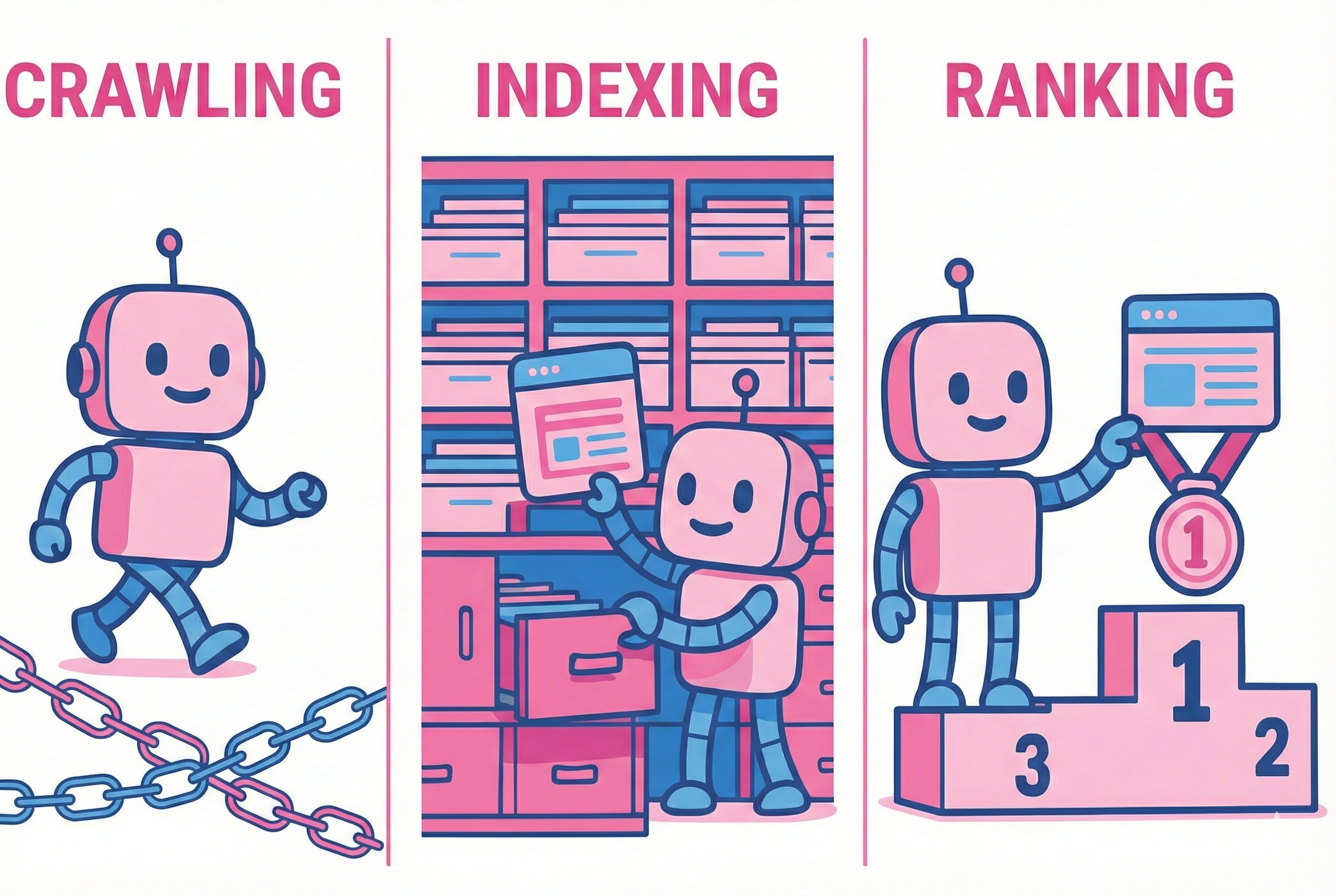
- Crawling (Discovery): Imagine an indefatigable explorer—Googlebot—navigating the vast ocean of the internet. Its map and compass are links. It traverses the web, jumping from link to link, discovering new and updated pages. A logical, densely interconnected internal structure is like a perfectly signed highway system, allowing the bot to reach every corner of your site. Without clear pathways, your content remains invisible to the explorer. If that's a recurring issue for you, it's worth checking out the top reasons why your site might be invisible on Google and how to fix them.
- Indexing (Filing): Once discovered, Googlebot acts like a meticulous librarian. It analyzes the content—text, headers, image alt tags—and files it into the correct "drawer" of its massive database, the Index. A thoughtful structure that groups content thematically acts like the library’s cataloging system, helping Google understand context and relationships.
- Ranking (Selection): This is the finale where algorithms decide which pages from the index best answer a user's query. They consider hundreds of factors, including content quality, UX, and authority. Structure plays a pivotal role here by defining the hierarchy of importance.
Step 2: How Website Structure Affects Each Stage
Your site structure isn't a passive observer; it actively shapes these processes. Let's look closer at how website structure affects your performance:
- Impact on Crawling: Good architecture ensures bots find every page without hitting dead ends. This directly impacts Crawl Budget—the number of pages Googlebot is willing and able to visit. If your structure is messy, the bot wastes time on irrelevant pages, ignoring your key content.
- Impact on Indexing: Logical content grouping (e.g., via directories or topic clusters) sends a clear signal about hierarchy. It tells Google: "This is a main category, and these are the supporting details."
- Impact on Ranking: Solid architecture is essential for distributing Link Equity (often called "link juice"). Through strategic internal linking, authority flows from strong pages (like the Homepage) to deep content. Pages that receive more internal links are perceived as more important, which can directly boost their rankings.
Step 3: Architecture, UX, and E-E-A-T Signals
Structure is the foundation of user convenience. If navigation is simple and information is easy to find, users stay longer and return more often. Google notices these behavioral signals (like lower bounce rates) and treats them as indicators of quality.
Furthermore, a clear structure amplifies E-E-A-T (Experience, Expertise, Authoritativeness, Trustworthiness) signals. Clearly defined "About Us" sections, author profiles, accessible contact data, and thematic content hubs build trust and position your site as an authority in its niche.
Part II: Design – How to Build a Solid Structure
Mistakes made during the architecture design phase are like structural flaws in a building—expensive and difficult to fix later. Investing in solid planning is one of the highest-ROI decisions in SEO.
Step 4: Planning Information Architecture (IA)
Information Architecture (IA) is a conscious design process that must precede any development. Before a single line of code is written, you must answer:
- What is the goal? (e.g., sales, lead gen, email list building)
- What paths will users take to achieve these goals?
- Which pages are mission-critical? (e.g., pricing, contact, main product categories)
Step 5: Keyword Research as Your Blueprint
Many people associate keyword research solely with writing copy. That is a mistake. Professional keyword research is the architectural blueprint of your website. If your editorial team happens to rely on AI tools for that copy, make sure they know the 10 things about ChatGPT before writing articles.
Analyzing what users search for helps you identify:
- Pillar Topics: Broad terms that become main navigation categories.
- Cluster Topics: Specific queries that evolve into subcategories, product pages, or blog posts.
The key is assigning keywords with different intents (informational, commercial, transactional) to the appropriate levels of your structure.
Step 6: Competitor Analysis – Learn from Their Blueprints
Analyzing the structure of successful competitors is a goldmine. Observe how they organize menus, create categories, and nest content. This isn't about blind copying; it's about intelligent analysis—identify their strengths and find gaps you can exploit to build a superior user journey.
Part III: Models and Patterns – Choosing the Right Strategy
There is no "one size fits all." Your choice depends on your site's size, goals, and industry.
Step 7: Main Site Architecture Models
Flat vs. Deep Structure
- Flat: Every page is accessible within 3-4 clicks from the homepage. This encourages rapid authority distribution but can lead to clutter on large sites.
- Deep: More logical and scalable for massive sites, but risks burying content so deep that it receives little link equity or bot attention. Modern SEO moves away from obsessing over "flatness" in favor of "logical accessibility."
Topic Clusters & Pillar Pages This is currently the most effective model for building topical authority.
- Pillar Page: A central, comprehensive page covering a broad topic (e.g., "Digital Marketing").
- Cluster Pages: Supporting articles exploring specific subtopics (e.g., "What is SEO?", "Facebook Ads"). Every cluster page links back to the Pillar.
This creates a dense web of relevance, signaling to Google that you are a subject matter expert.
Silo Structure Conceptually similar to clusters but stricter. In a "Silo," pages link only to other pages within the same category. Cross-linking between different silos is minimized. This maximizes authority concentration but can hinder natural content discovery.
Criterion | Topic Cluster Model | Silo Model | Flat Structure |
| Building Topical Authority | Very High | Highest (within silo) | Low |
| Scalability | High | Medium (risk of isolation) | Low (risk of chaos) |
| Authority Flow | Flexible & Controlled | Concentrated but restricted | Fast but diluted |
| Cannibalization Risk | Low (if implemented well) | Very Low | High |
| Best For | Blogs, B2B, Educational sites | Niche affiliate sites | Small business sites |
Part IV: Structural Elements – Navigation, URLs, and Linking
Now, let’s translate the abstract plan into tangible site elements.
Step 8: Designing Navigation and Friendly URLs
Main Navigation (Menu): Your header and footer are your primary signposts.
- Header: Critical pages for the user (Services, Products, About, Contact).
- Footer: Important but secondary links (T&C, Privacy Policy, Careers).
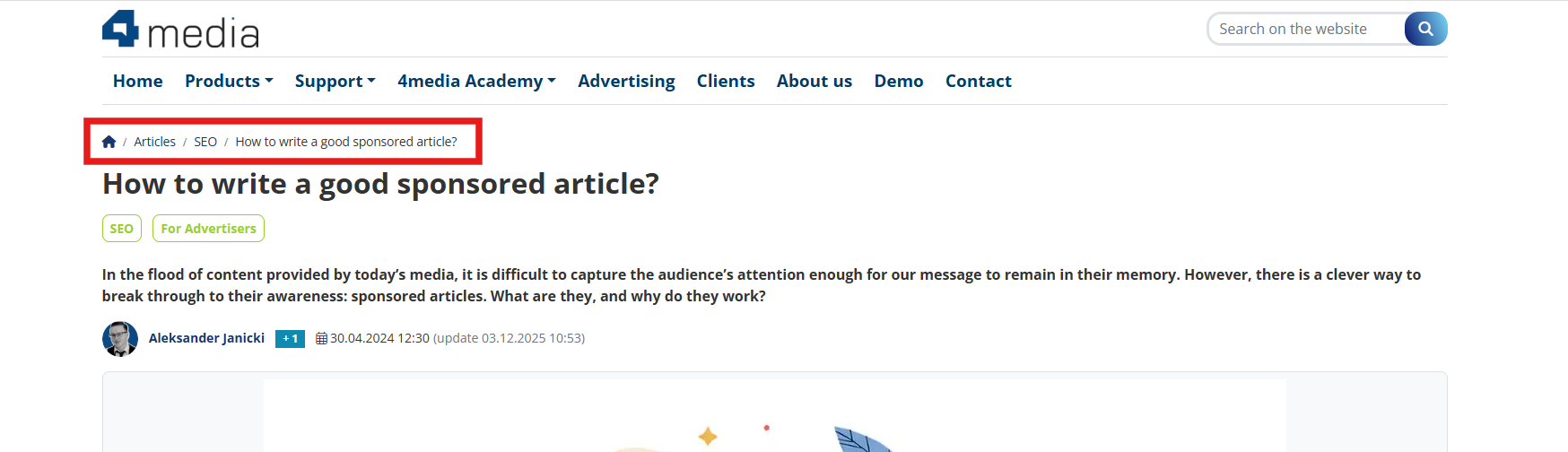
Breadcrumbs: A path of links showing the user’s location (e.g., Home > Clothing > Men's Shirts). Breadcrumbs improve orientation and strengthen internal linking by systematically passing authority "up" the hierarchy.
SEO-Friendly URLs: A URL is a signal to Google. It should be short, logical, and readable. If you want to dive deeper into this specific element, our ultimate guide to URL structure for SEO covers all the bases.
- Use lowercase.
- Separate words with hyphens (-).
- Include the main keyword, but don't stuff it.
- Reflect hierarchy (e.g., https://www.google.com/search?q=yoursite.com/services/seo/audit).
Step 9: Internal Linking – Your Site’s Circulatory System
Internal linking is 100% under your control and is one of the most powerful tools in your arsenal.
Anchor Text: This is the clickable text of a link. It should be descriptive and relevant. Use a mix of anchors:
- Exact Match: "SEO services" (use sparingly).
- Partial Match: "check our guide on SEO services".
- Branded: "according to data from 4media.com".
- Generic: "click here" (low SEO value).
Caution: Overusing exact match anchors can look like spam (keyword stuffing) and trigger penalties.
Step 10: Advanced Techniques and Link Auditing
- Orphan Pages: Pages with zero internal links pointing to them. They are invisible to bots and users. Tools like Screaming Frog or Semrush help identify them.
- Broken Links: Links leading to 404 errors waste authority and ruin UX. Fix them regularly.
- Keyword Cannibalization: When two pages compete for the same keyword, Google gets confused. Strategic internal linking helps indicate which page is the "canonical" or master version for a specific topic.
Part V: Technical Control – Managing Robot Access
Technical management is about strategically directing Google’s attention to your most important assets.
Step 11: Optimizing Crawl Budget
The goal is to ensure Googlebot doesn't waste time on junk. Major budget wasters include:
- Faceted Navigation in E-commerce: Filters and sorting that generate thousands of unique URLs.
- Duplicate Content.
- Soft 404s: Error pages returning a "200 OK" status.
- Low-Value Assets: Login pages, cart pages, internal search results.
Step 12: The robots.txt File – The Gatekeeper
robots.txt is a simple text file that tells bots where not to go. It is your first line of defense.
- Crucial distinction: robots.txt blocks CRAWLING (visiting). The noindex tag blocks INDEXING (appearing in results).
- Never block a page in robots.txt that you want to remove using noindex. The bot must be able to visit the page to see the noindex instruction.
Step 13: The Sitemap (sitemap.xml) – The Guidebook
While robots.txt says "keep out," the sitemap is the VIP guest list of URLs Google should discover.
- Include only canonical URLs returning a 200 OK status.
- Exclude blocked pages, redirects, or noindex pages.
- Submit your map to Google Search Console to track progress. To get the full picture of your performance, pair this with our technical guide to Google Analytics 4 and Search Console.
Step 14: Managing Redirects and Errors
- Canonical Tag (rel="canonical"): Use this to point to the "master" version among duplicate pages.
- 301 Redirect: Use this whenever a page permanently moves. It passes the majority of the link equity to the new address.
In the context of Sponsored Articles, this duo is vital. If you do a lot of paid content, understanding how the canonical tag works in sponsored content is an absolute must. A canonical tag tells Google which version of a syndicated article is original, and a 301 redirect ensures that if you delete a product page linked from a pricey sponsored post, the "link juice" is redirected to a relevant category rather than hitting a 404 dead end.
Cross-Domain Canonical: If you syndicate content (publish the same article on your site and a large external portal), you must ensure the external site points the canonical tag back to your original URL. Without this, the bigger domain will almost always "eat" your ranking, stealing traffic for your own content.
From Theory to Practice with the Right Tools
Building and maintaining a solid site architecture is not a one-time task; it is a continuous process. Your site grows, business goals shift, and algorithms evolve, especially now that we all have to learn how to survive and rank in the era of generative AI search. Regular structural audits and technical hygiene are the keys to maintaining high visibility.
Implementing these rules can seem daunting, especially for large news portals. Fortunately, modern tools can shift the technical burden from editors to the system.
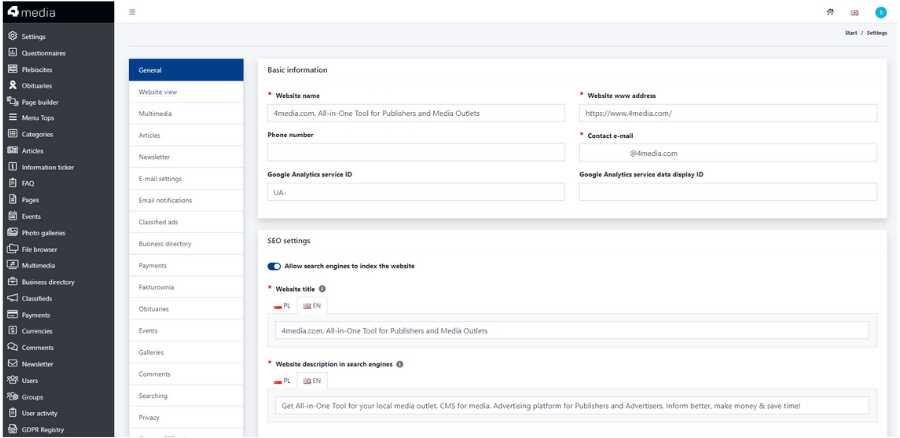
CMS4Media, for example, is a content management system built specifically for publishers. It features built-in SEO fields that give you full control over titles, descriptions, indexing, and canonical URLs without touching a line of code. This allows editorial teams to focus on creating content while the system ensures the technical SEO foundation remains solid. Staying adaptable to these changes is key, much like figuring out how to survive the AI shifts in 2026. It automates core web vitals optimization and manages internal link structures, acting as an all-in-one solution.
However, perfect internal structure is only half the battle. You also need to build authority from the outside through high-value backlinks. Platforms like ADS4MEDIA.online allow advertisers to reach thousands of thematic and local portals for sponsored content publication. Of course, a great link is only as good as the content surrounding it, so brush up on how to write a good sponsored article before you hit publish. This is a powerful way to acquire the links that strengthen your domain authority, complementing your internal architecture strategy. And when you're out there building those links, knowing exactly what SEO metrics like Ahrefs DR and Majestic TF actually mean will save you from bad investments.
Approach your site architecture with a strategic mindset, equip yourself with the right tools, and Google will reward you with sustainable traffic growth.