polski
 español

 Magdalena Szypulska
Optimizing for AI search engines is becoming a crucial element of building online visibility today. Users are increasingly less likely to browse through subsequent pages of search results, and more often expect specific answers generated by artificial intelligence. As a result, even a valuable website and attractive offer can lose traffic and become invisible on Google if they are not adapted to the way AI systems search, analyze, and present information.
Modern language models process vast amounts of data in a matter of seconds, and then select only those sources they deem most credible and useful. It is precisely based on these that they create answers for users. If your website is not recognized as a valuable source of information, its content may remain invisible to potential clients.
Fortunately, this is not a process based on chance.
Visibility in AI-generated answers can be analyzed, measured, and systematically increased through properly planned optimization.
From SEO to GEO. What is the Paradigm Shift?
For years, the effectiveness of SEO activities was evaluated primarily using the Share of Voice metric. It determined what share of search engine traffic a given domain captured for selected keywords in traditional Google results, often analyzed alongside popular domain authority metrics like Ahrefs DR and Majestic TF.
Today, however, another metric is gaining importance - Share of Source, i.e., the share in sources utilized by artificial intelligence systems.
Share of Source shows how often content from a given website is indicated as a source of information and cited in AI-generated answers. While the goal previously was to achieve the highest possible position on the search results list, it is now crucial to provide information credible and valuable enough for the language model to use it when generating an answer.
With the development of AI-based search engines, the rules of optimization are also changing. Traditional activities, such as excessive keyword stuffing or expanding the backlink profile, are losing their significance for digital marketers figuring out how to survive and rank in the era of generative search.
GEO (Generative Engine Optimization) is playing an increasingly important role, which is an approach focused on preparing content and data structure in a way that makes it easier for AI systems to quickly find, interpret, and use them as a credible source of information.
Market analyses indicate that traffic coming from AI-based platforms, such as ChatGPT or Gemini, often features a higher conversion rate than traditional organic traffic from internet search engines.
This is primarily due to user intent. People using AI tools are usually looking for specific answers, recommendations, or solutions, rather than a list of pages to analyze themselves.
When an artificial intelligence system recommends a specific product, service, or company, and simultaneously bases its answer on information from a given website, the probability of performing the desired action - purchase, contact, or sending an inquiry - significantly increases.
Why Does the AI System Choose This Particular Article?
Most modern AI assistants, including ChatGPT, Gemini, or Perplexity, use solutions based on the RAG (Retrieval-Augmented Generation) architecture.
In practice, this means that the model first searches for information in available sources, and only then generates an answer for the user. However, before data is used, it goes through a quality and usefulness evaluation process.
One of the most important criteria is semantic relevance. The content should directly answer the user's question and provide specific information, without unnecessary digressions.
A clear site structure and architecture that Google loves is equally important for AI parsers.
Headings, tables, lists, and correctly applied HTML tags make it easier for AI systems to interpret and organize data. The timeliness of information and the presence of specific data, examples, and facts confirming the credibility of the content also matter.
For this reason, the BLUF (Bottom Line Up Front) method is playing an increasingly important role, which consists of presenting the most important information right at the beginning of a section or paragraph. AI models look for quick and unambiguous answers during content analysis, which is why it's worth placing key conclusions, definitions, or recommendations right at the beginning. The elaboration, additional explanations, and broader context should only be included later in the text.
The robots.txt File - How to Manage AI Bot Access?
One of the first steps in optimizing a website for AI search engines - alongside ensuring Google can discover your portal via a modern sitemap - is to check if the robots responsible for indexing and searching content have access to the site (i.e., what is the content of the robots.txt file located on the server).
Even valuable and well-optimized materials will not appear in AI-generated answers if the appropriate bots are blocked at the server level. This is a technical hurdle similar to diagnosing why a site is blocked in certain regions even without illegal content. The basic access control tool is the robots.txt file located in the site's root directory.
Many misunderstandings have arisen around AI bots.
Some website owners block all robots associated with artificial intelligence, wanting to prevent their content from being used to train models. However, this approach can unknowingly limit the site's visibility in AI-generated answers. It's crucial to understand that not all bots serve the same function.
For example, GPTBot is primarily used to acquire data utilized in developing and training OpenAI models. On the other hand, OAI-SearchBot is responsible for searching and retrieving content used when presenting results and answers to users.
PerplexityBot plays a similar role in the Perplexity ecosystem. Blocking robots responsible for searching can cause content to no longer be included in answers generated by AI tools, even if it remains visible in traditional search results.
To check the configuration, log into the hosting panel or connect to the server using an FTP client. Then, locate the robots.txt file located in the domain's root directory, usually in the public_html folder. It's worth making sure it doesn't contain rules blocking access to robots responsible for searching and indexing content.
If you care about restricting the use of materials for training AI models, but at the same time want to maintain visibility in AI-generated answers, you can block training bots while leaving access for search bots. A properly configured file should include the following directives:
User-agent: OAI-SearchBot Allow: /
User-agent: PerplexityBot Allow: /
User-agent: GPTBot Disallow: /
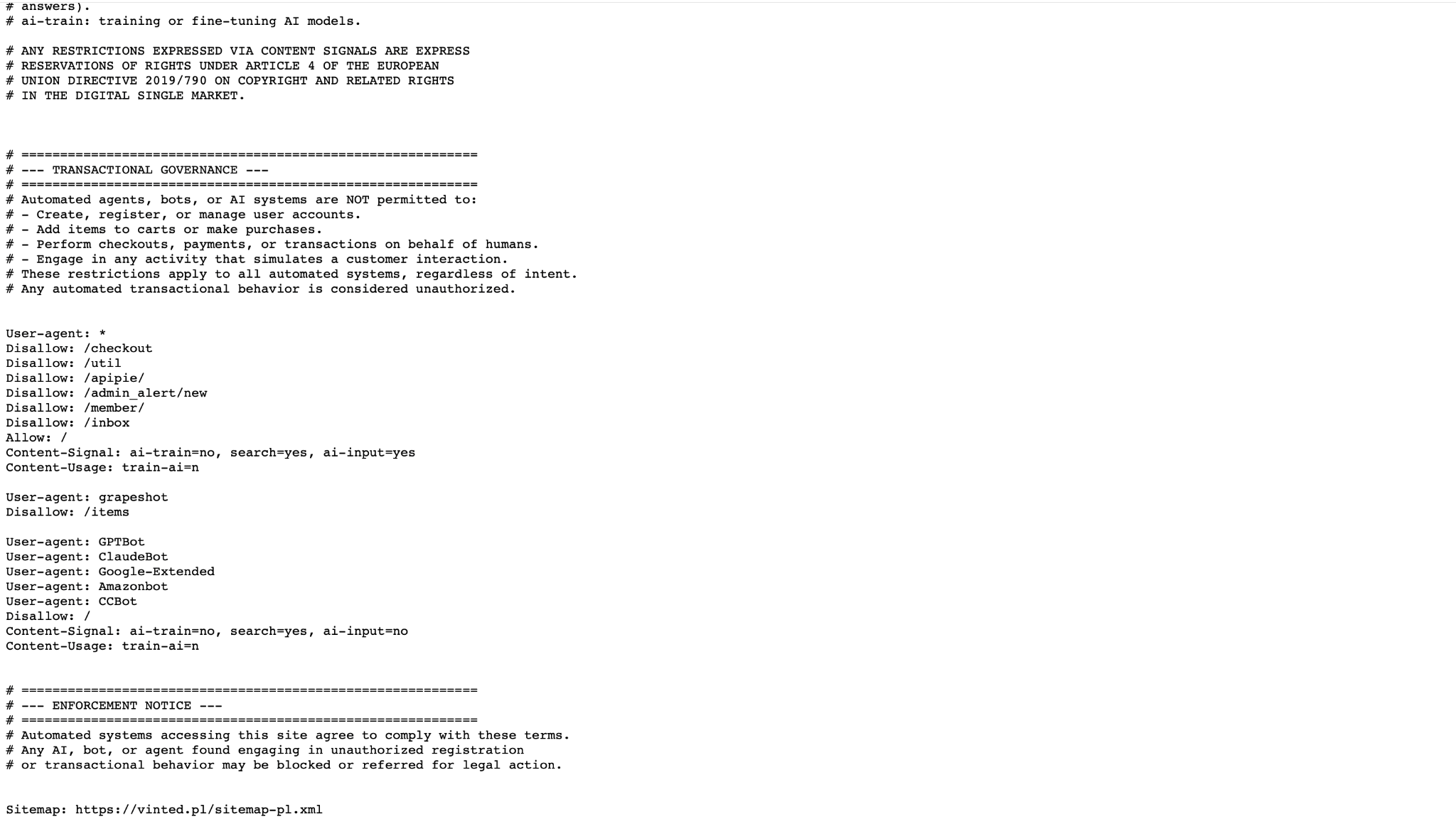
After saving the changes, it's worth checking the correctness of the configuration and regularly monitoring the documentation of AI service providers.
The development of AI-based search engines is very dynamic, so the list of used bots and their functions may change over time.
The most important rule is simple: blocking bots responsible for training models does not have to mean giving up visibility in AI answers.
To retain the chance of appearing in results generated by artificial intelligence systems, you must ensure that robots searching and indexing content still have access to the website.
The llms.txt File - An Additional Content Map for AI Systems
Traditional website HTML code contains many elements that have no meaning for language models. Navigation menus, analytics scripts, ads, CSS styles, or UI components are essential for users but make it difficult to quickly reach the actual content, especially if your CMS choice slows down the site and kills your SEO.
For this reason, the concept of the llms.txt file, which acts as a simplified guide to the site's most important resources, is generating increasing interest.
The llms.txt file is placed in the site's root directory, just like robots.txt. Its task is to point to the most valuable sections of the website in an organized, easy-to-process format.
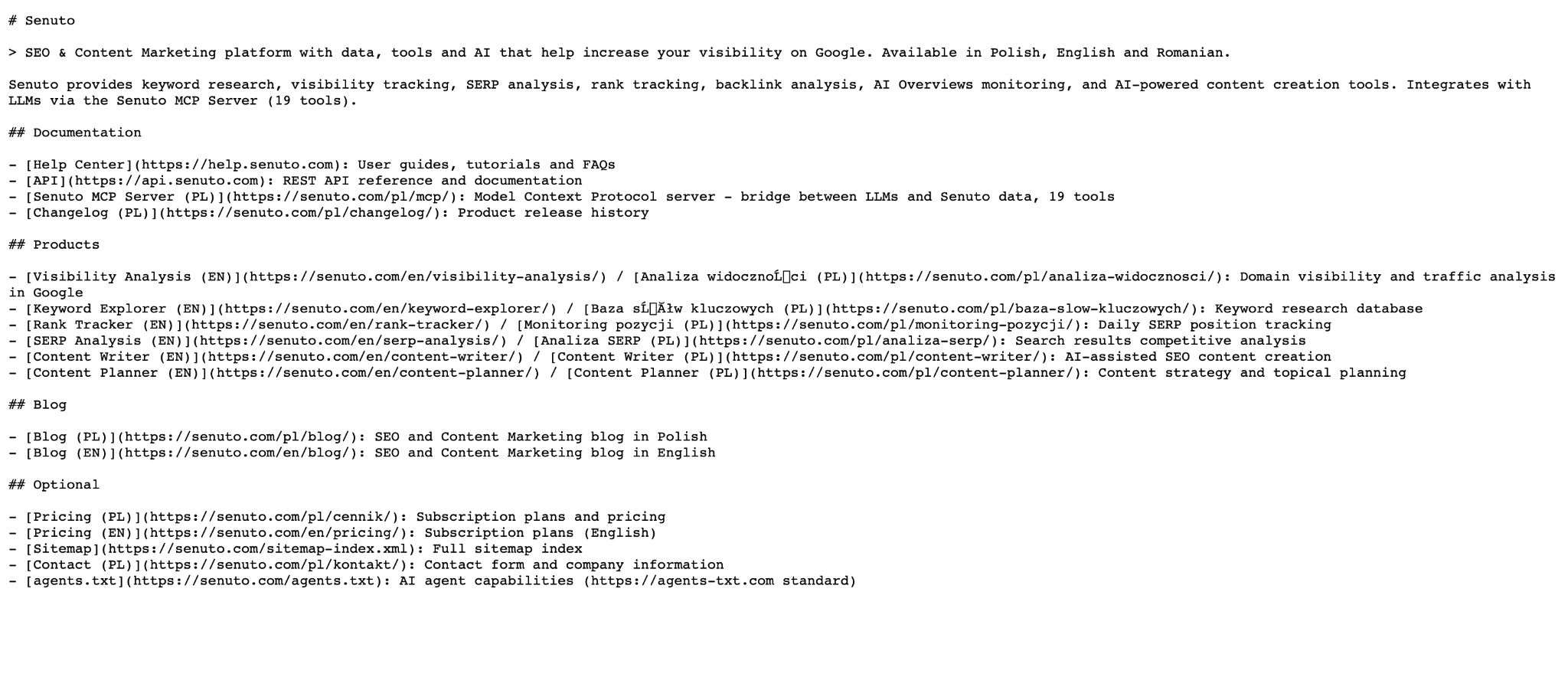
Instead of analyzing the entire site structure, the AI system can more quickly identify pages containing key information, documentation, guides, or expert articles.
In practice, the file contains a list of the most important URLs - which should ideally follow a logical and optimized structure - along with a short description of their content. The simple Markdown format is most often used for this, which is readable by both humans and text-processing systems.
How to Create an llms.txt File?
Preparing the file is relatively simple and does not require advanced technical knowledge. First, create a new text file and save it under the name llms.txt.
Then, add links to the most important sections of the site along with a short description of their content.
The sample content of an llms.txt file might look like this:
XYZ Company Website
Knowledge Base
Knowledge Base Expert articles on SEO, GEO, and internet marketing.
Documentation
Documentation Instructions, guides, and technical materials for clients.
After preparing the file, it must be placed in the site's root directory so that it is accessible at your main domain address followed by /llms.txt.
Although llms.txt does not replace an XML sitemap or standard SEO activities, it can serve as an additional signal making it easier for AI systems to find the most important content.
In the case of extensive websites with a large number of articles, documentation, or expert materials, it also allows for better organization of resources intended for indexing and analysis.
Re-architecting the Technical Foundation: The Imperative for CMS 4Media
The transition from SEO to GEO necessitates a rigorous reevaluation of a publisher's underlying technological stack. Legacy Content Management Systems (CMS), particularly open-source platforms bloated with decades of plugins, unstructured code, custom widgets, and heavy client-side scripts, actively impede AI retrieval. LLM crawlers operate with strict context windows and parsing limits. If a crawler is forced to navigate a labyrinth of inline CSS and complex JavaScript to locate the core content, it will likely abandon the crawl entirely.
To capitalize on GEO, publishers require an agile, structurally clean, and media-rich platform. This is where specialized infrastructure like CMS 4Media becomes a distinct competitive advantage.
Developed as a comprehensive, enterprise-grade ecosystem tailored exclusively for digital publishers, local media, and broadcasters, CMS 4Media natively addresses the mechanical requirements of Generative Engine Optimization through several core architectural advantages:
- Structured Content and Semantic Clarity: CMS 4Media employs an advanced visual widget system that enforces a clean, modular hierarchy. Editors can construct complex layouts without touching the underlying code, ensuring the HTML output remains pristine and highly readable for AI parsers.
- GEO-Optimized Workflows: The text editor is designed specifically for modern publishing. It includes dedicated fields for content "Introductions" that perfectly align with the BLUF (Bottom Line Up Front) methodology. These leads are automatically formatted and wrapped in specific HTML markers that explicitly communicate with search robots, identifying the most vital, extractable summaries required for RAG systems.
- Rich Multimedia Contextualization: As generative models become increasingly multimodal, contextualizing video and audio is paramount. CMS 4Media features a robust multimedia module that creates dedicated subpages for uploaded assets, allowing editors to append detailed titles, descriptive metadata, and WebVTT subtitles. This provides AI crawlers with deep, text-based context, drastically increasing the likelihood that a publisher's rich media will be referenced in AI answers.
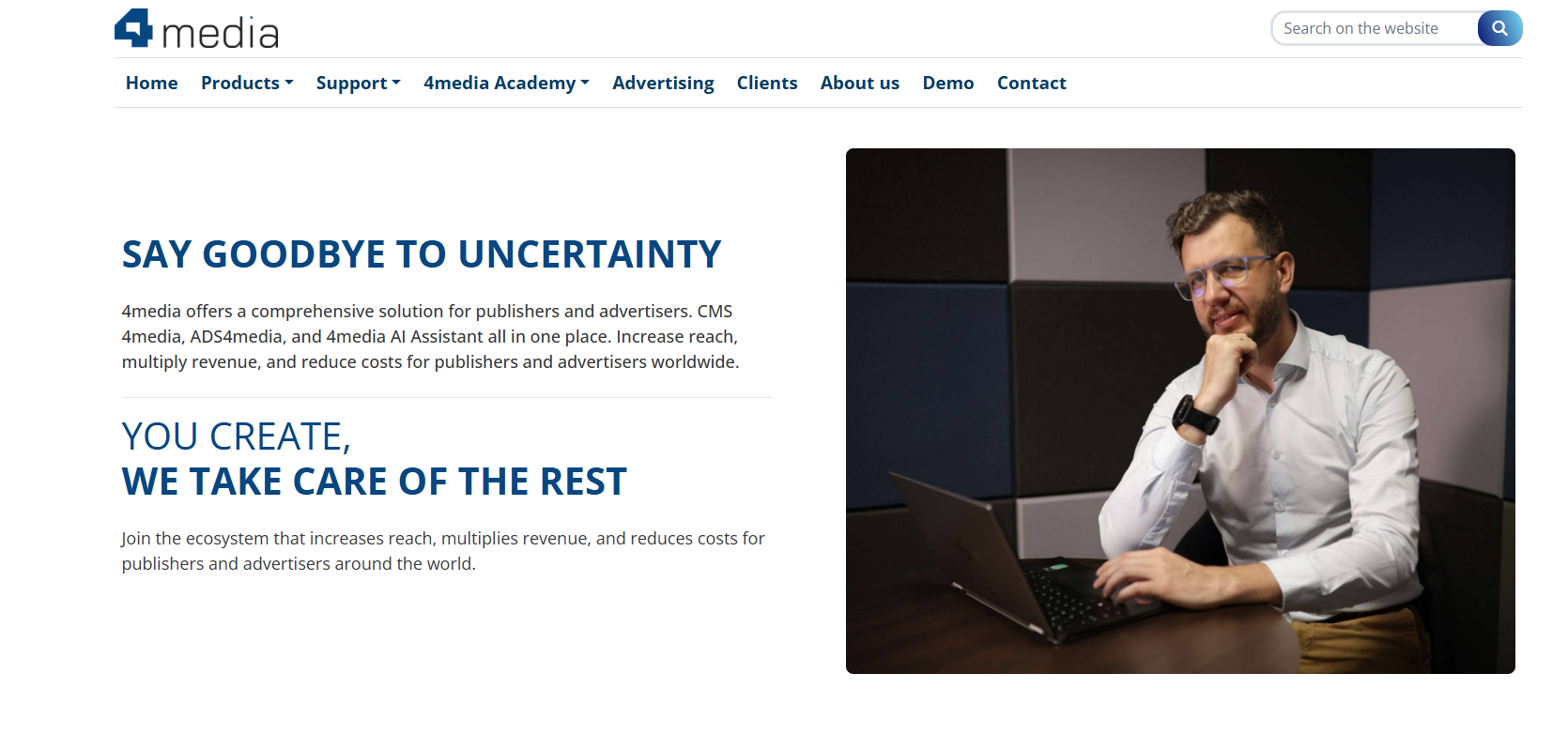
For media organizations looking to survive the transition to generative search, upgrading to an AI-ready infrastructure like CMS 4Media ensures that high-quality journalism is perfectly formatted for the algorithms that now distribute it.
How to Measure AI Search Engine Traffic in Google Analytics 4?
One of the biggest challenges associated with optimization for AI search engines is measuring the effects of the conducted activities. Proper tracking requires a solid understanding of web analytics, similar to setting up your workspace with a technical guide to Google Analytics 4 and Search Console.
Unlike traditional search engines, traffic coming from tools such as ChatGPT, Perplexity, or Gemini is not always unambiguously classified in analytics reports.
Some visits pass on source information, while others may be assigned to Direct, Referral, or Unassigned channels, which makes it difficult to assess the real impact of traffic generated by AI.
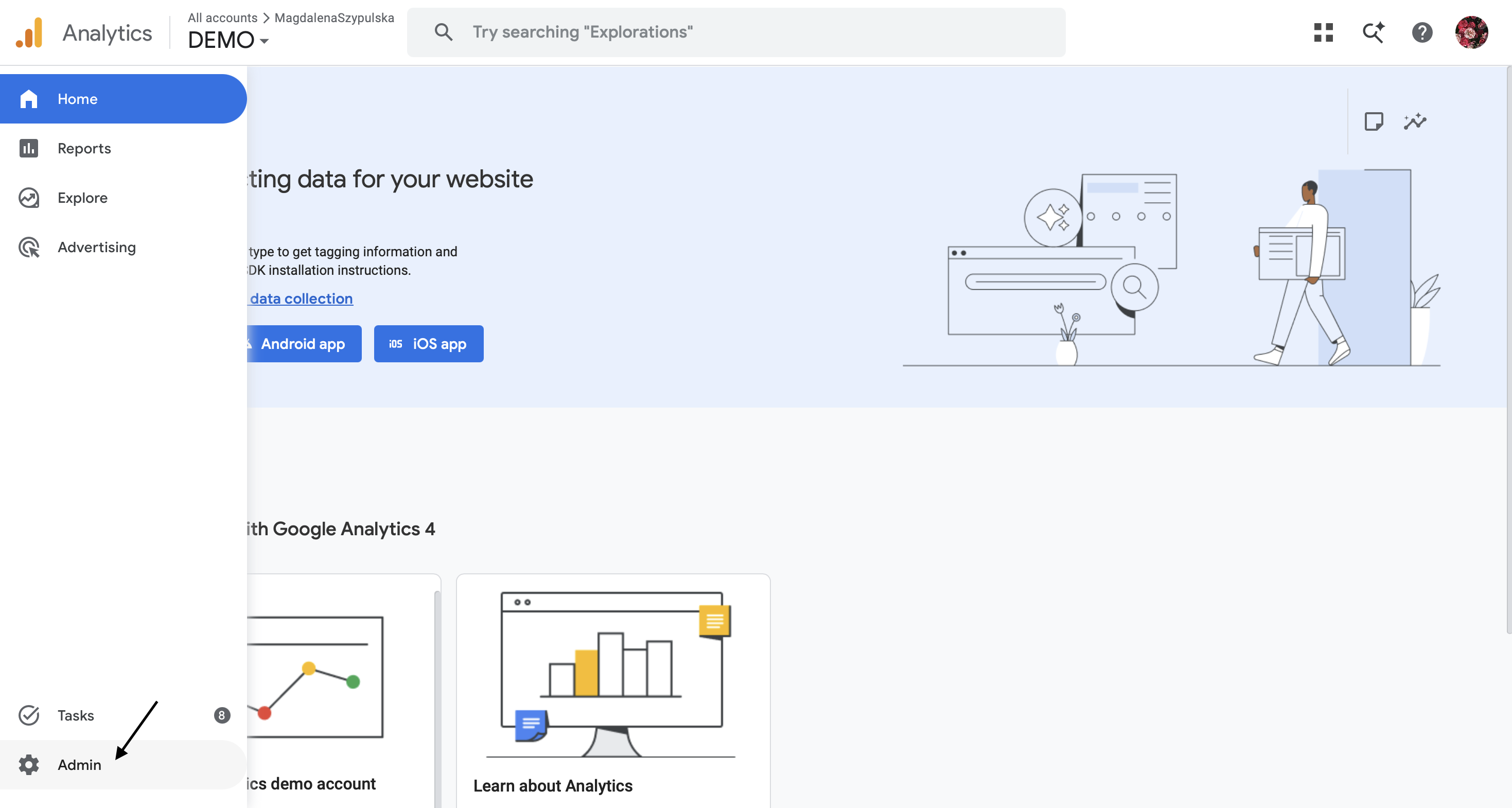
To get a more complete picture of the situation, it's worth creating a dedicated channel group in Google Analytics 4 for visits coming from the most popular AI-based platforms. This allows you to monitor the number of sessions, user behavior, and conversion rates for this traffic source.
How to create an "AI Traffic" channel in GA4?
In the Google Analytics 4 panel, go to the Admin section, and then select Channel groups under the Data display area.
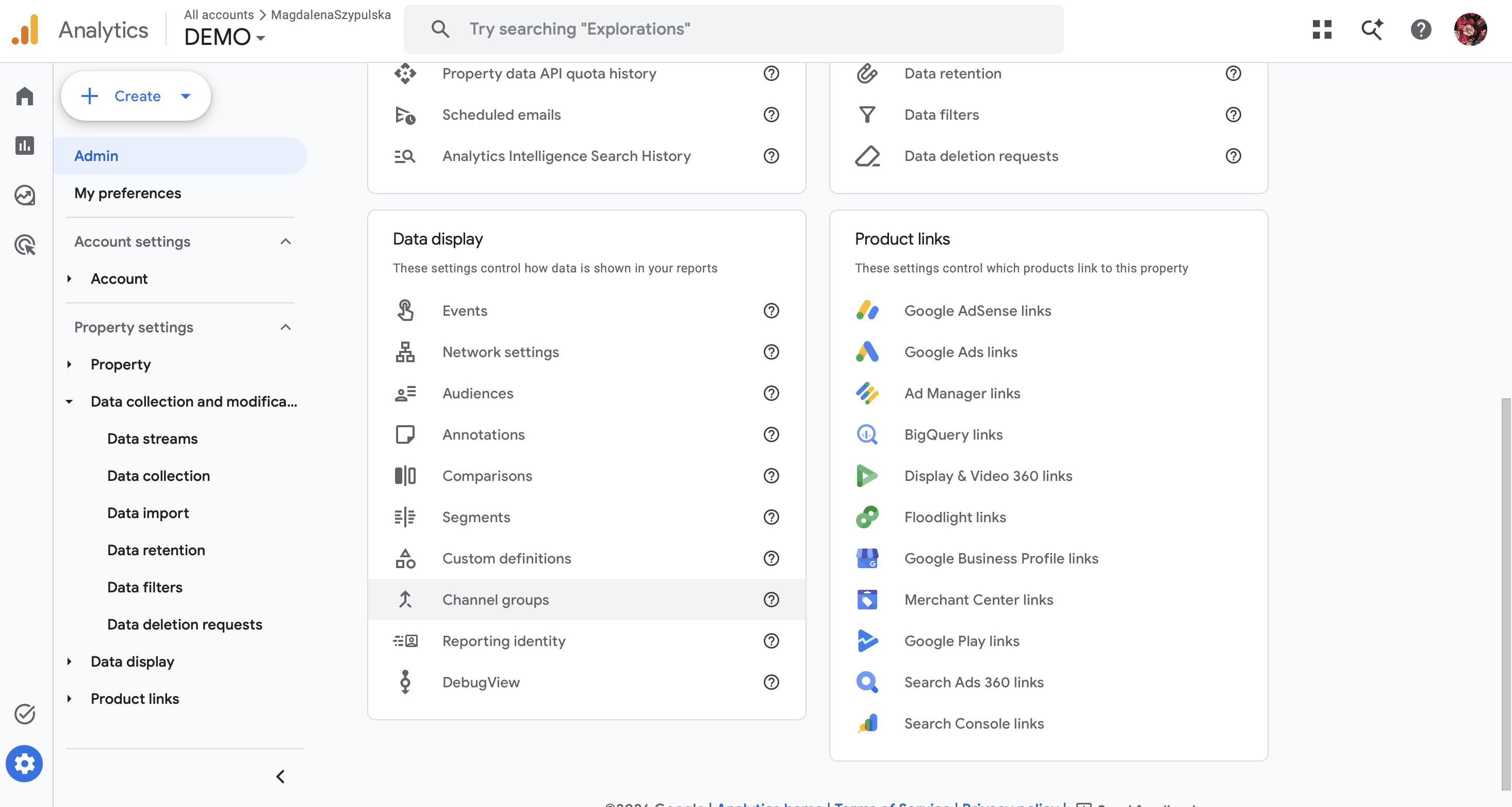
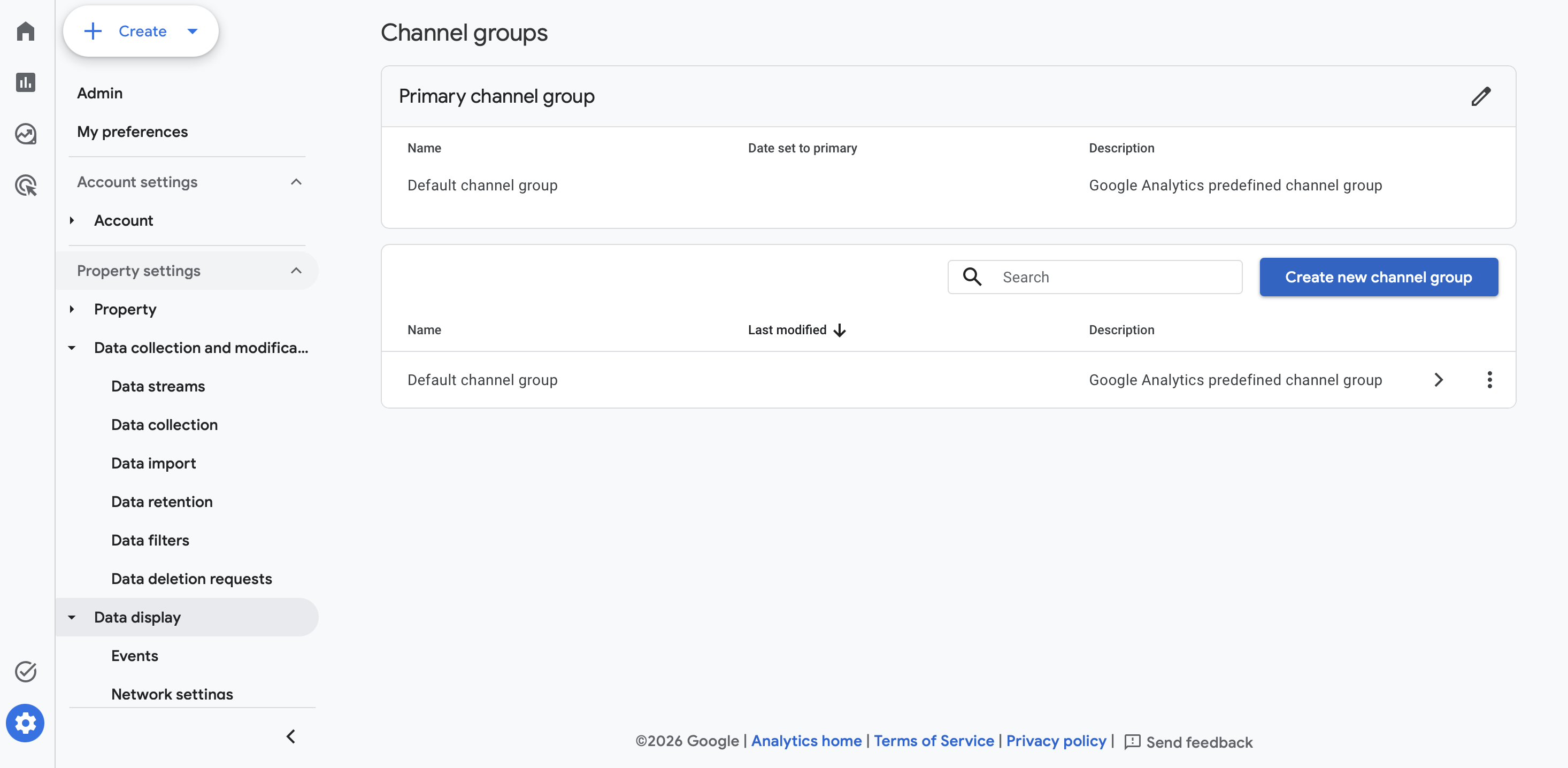
You can create a new channel group or edit an existing custom group. Click the "Create new channel group" button.
Next, add a new channel, giving it a name, for example, "AI Traffic".
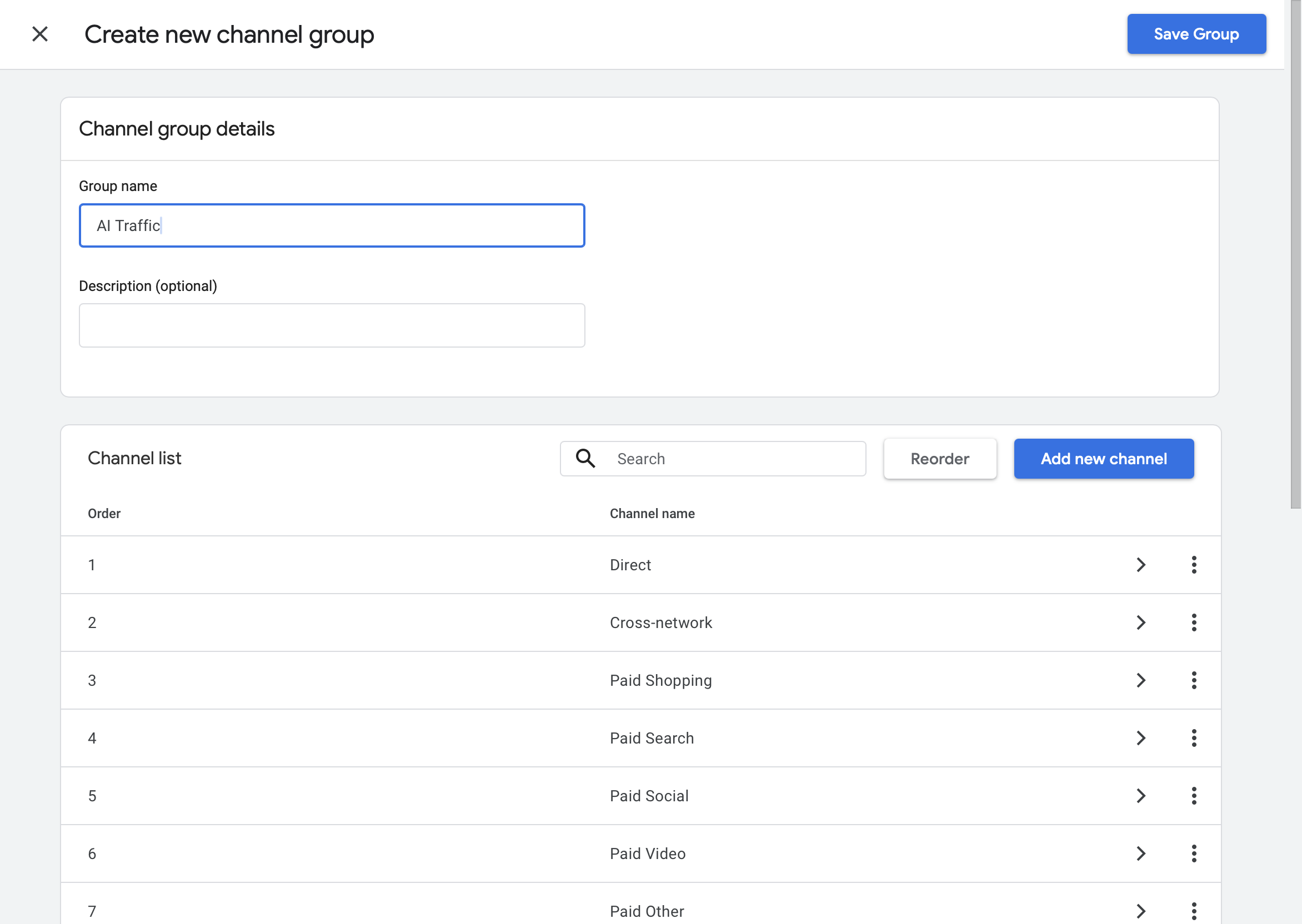
In the conditions configuration, select the Session source parameter, and set the operator to matches regex.
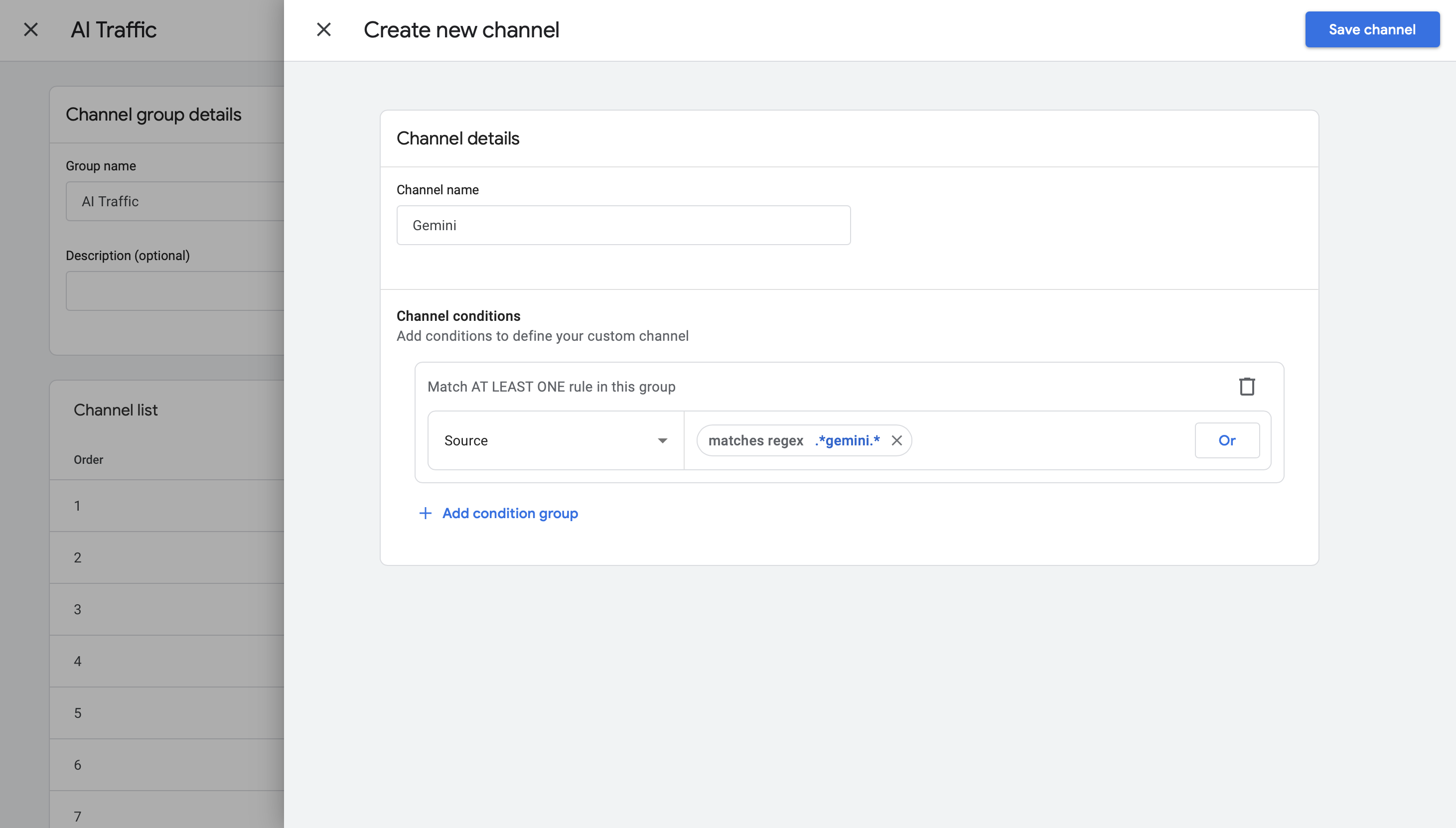
Depending on your needs, you can create one collective channel covering all traffic from AI platforms or separate channels for each tool.
The first solution allows you to quickly assess the scale of AI-generated traffic, while the second makes it easier to analyze the effectiveness of individual platforms.
For the collective "AI Traffic" channel, you can use a regular expression such as:.*chatgpt.*|.*openai.*|.*perplexity.*|.*claude\.ai.*|.*gemini.*|.*copilot.*
If you care about more detailed data, create separate channels for individual traffic sources using partial expressions:
- ChatGPT/OpenAI: .*chatgpt.*|.*openai.*
- Perplexity: .*perplexity.*
- Claude: .*claude\.ai.*
- Gemini: .*gemini.*
- Microsoft Copilot: .*copilot.*
During channel configuration, select the "matches regex" condition, and then paste the appropriate pattern.
Special attention should be paid to the order of rules in the channel group.
Google Analytics analyzes them from top to bottom and assigns the session to the first matching channel.
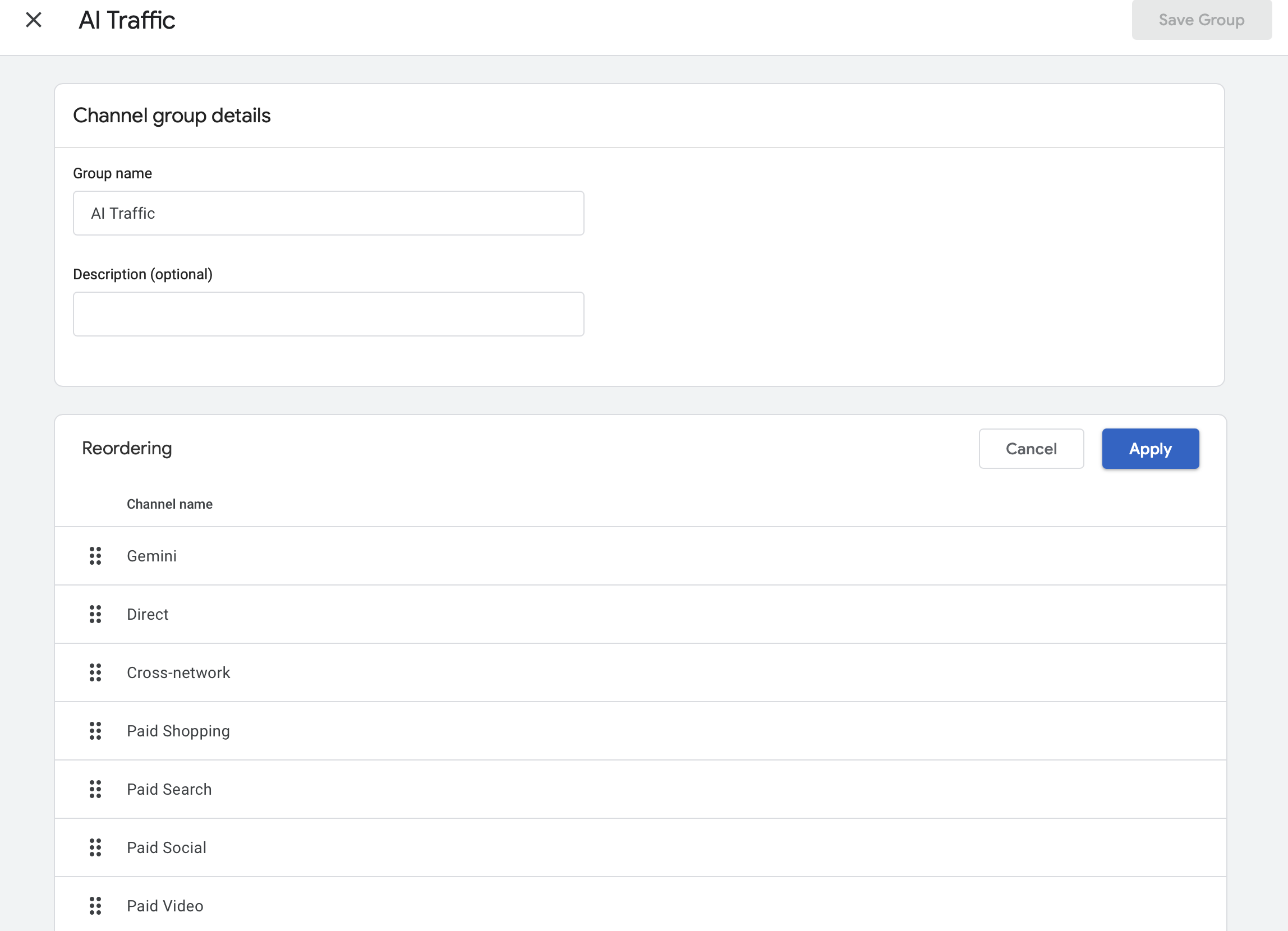
After creating the channel, click the "Reorder" button located next to the channel list. Move the newly created channel, and confirm the decision with the "Apply" button.
This means that the newly created "AI Traffic" channel should be above general rules, such as Referral.
Otherwise, some visits will be qualified into other categories, which will hinder later analysis.
After saving the configuration, data will start appearing in reports according to the new classification rules. Thanks to this, it will be possible to monitor what share of traffic and conversions is generated by users landing on the site via artificial intelligence tools.
Where exactly to look for this information?
To find the new group in the Google Analytics 4 panel, select Reports from the menu on the left, then expand the Acquisition (Lead generation) section and click Traffic acquisition. In the main data table, you will find your newly created "AI Traffic" channel.
Tools for Monitoring Citations. From SaaS to Python
Occasionally checking brand visibility by manually entering queries into ChatGPT, Gemini, or Perplexity only allows you to get a general picture of the situation.
However, this approach is hard to consider a reliable measurement method.
Answers generated by language models can vary depending on the context of the conversation, current data sources, the phrasing of the question, or the search mechanisms used.
For this reason, effective monitoring in the GEO area requires a more systematic approach.
More and more tools specialized in analyzing brand visibility in AI-generated answers are appearing on the market.
Platforms such as Otterly.ai or Profound automatically send sets of predefined queries to various language models, and then analyze the answers for the presence of indicated brands, products, or domains.
A free, budget-friendly alternative to start with is to use a free account in the Ahrefs tool (Ahrefs Webmaster Tools). You just need to add your domain there as a project.
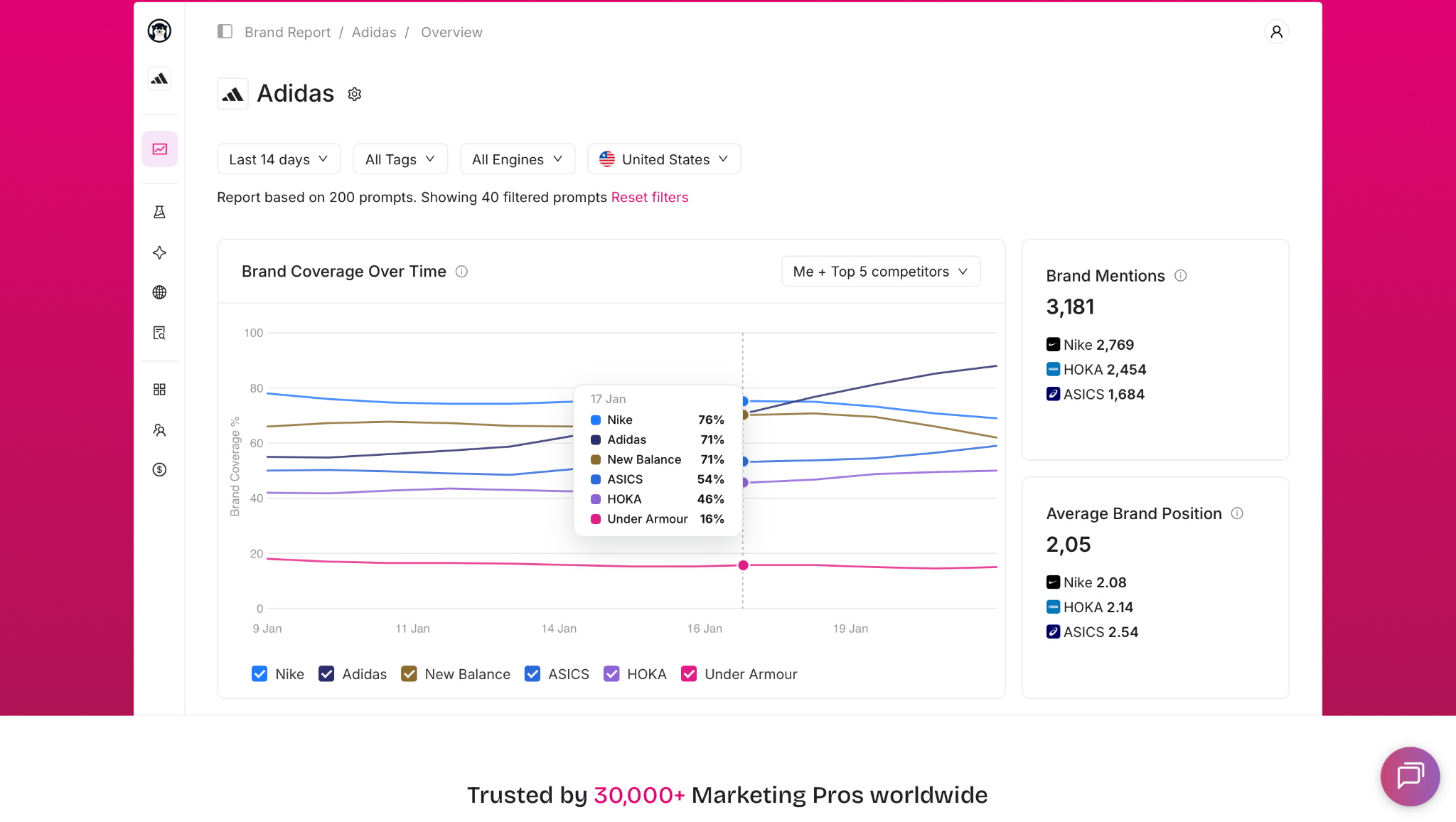
In the basic reports, a list of AI systems in which citations of your website appeared will be visible.
However, it should be remembered that this is a very basic version - to see more detailed data, such as specific subpages used as a source or exact citation dates, it is necessary to upgrade to a paid package.
Thanks to this, it is possible to track changes in visibility over time and identify topics where the competition is more frequently cited as a source of information.
Companies with technical resources can also create their own monitoring system. In practice, this involves using APIs provided by AI model providers to automatically ask questions and analyze the obtained answers.
These types of solutions allow you to monitor specific keywords, check the frequency of brand occurrences, and identify sources indicated by models when generating answers.
The greatest advantage of automation is the ability to regularly collect data and observe trends.
Thanks to this, it's easier to detect areas where the brand is rarely cited, and then supplement the content with missing information or expand sections answering users' specific questions.
In practice, this allows you to react faster to changes occurring in AI search engines and more effectively increase the site's share in sources utilized by language models.
FAQ Section
How does AI optimization (GEO) differ from classic SEO?
SEO and GEO share a common goal - increasing content visibility on the internet - however, they use slightly different mechanisms.
Classic SEO focuses on improving the site's position in search results by optimizing content, site architecture, user experience, and the link profile. GEO (Generative Engine Optimization) focuses on increasing the probability that the content will be used as a source of information by artificial intelligence systems.
In practice, this means a greater emphasis on clear information structure, unambiguous answers, credible data, and formats that facilitate analysis by language models. It's no longer just about taking a high position in search results, but also about the content being recognized as a valuable source when generating an answer by AI.
Why does ChatGPT point to a competitor's site more often than mine?
There can be many reasons. Language models and AI search systems prefer content that clearly answers users' specific questions.
If competitors publish more organized materials, use clear headings, sections with key takeaways, tables, lists, and data backed by sources, their content may be easier to interpret and cite.
Domain authority, the timeliness of published information, brand presence in other credible sources, and the way knowledge is presented also matter.
In many cases, improving the overall content quality and applying technical on-page fixes - such as using the proper canonical tag in sponsored content to consolidate link equity - can significantly increase the chances of appearing in AI-generated answers.
Will blocking GPTBot in the robots.txt file cause the site to disappear from ChatGPT results?
No. GPTBot is primarily responsible for acquiring data used to develop and train OpenAI models.
Blocking it does not mean automatic removal of the site from search results or answers generated by ChatGPT.
If you want to restrict the use of content for training purposes while maintaining visibility in search, it is crucial to leave access for bots responsible for indexing and retrieving content for search purposes, such as OAI-SearchBot.
These are the ones that can use the website's content when creating answers and presenting sources to users.
Key Takeaways
- Share of Source is gaining importance as a complement to the traditional Share of Voice metric. It's becoming increasingly important not only to occupy high positions in search results, but also to be present in sources utilized by AI systems.
- The robots.txt file requires conscious configuration. Blocking bots responsible for training models does not have to affect website visibility, however, blocking searching and indexing robots can limit its presence in AI-generated answers.
- The llms.txt file can make it easier for language models to find the most important content on the site and is a valuable addition to GEO-related activities.
- A modern technical foundation is essential. Upgrading to an AI-ready infrastructure like CMS 4Media ensures clean HTML, GEO-optimized workflows, and proper media contextualization, bypassing the limitations of legacy platforms.
- Traffic coming from AI platforms is not always unambiguously visible in Google Analytics 4. It's worth creating custom channel groups to more effectively monitor this user segment.
- Optimization for AI search engines is based on a clear content structure, exposing the most important information at the beginning of a section, and providing specific, credible data.
- GEO does not replace SEO, but extends it with activities increasing the chance of using content as an information source in answers generated by artificial intelligence, which is equivalent to the classic positioning process in the AI era.